Introduction
Animated video has moved from "nice to have" to a standard production format across corporate learning and development (L&D), federal training programs, and nonprofit education. The numbers reflect this shift: according to Panopto's 2024 Workforce Training Report, video-based training is the primary modality for 52% of organizations, with video used for onboarding by 70% and compliance by 66%.
But knowing that animated video works is different from knowing what great animated e-learning looks like. That gap — between understanding the format and commissioning something effective — is what this post addresses.
What follows is a curated set of 15+ real-world animated e-learning video examples, organized by training use case.
Key Takeaways
- Richard Mayer's multimedia learning research shows a median effect size of 1.39 for words plus pictures vs. words alone — animated video with narration outperforms text-only training on comprehension
- Four animation styles lead e-learning production: whiteboard, motion graphics, character animation, and explainer video, each suited to different training goals
- This post covers 15+ examples across five use cases: compliance, onboarding, technical training, safety, and soft skills
- Effective animated e-learning videos stay concise, target one learning objective, and meet accessibility standards
- Production options span DIY tools, freelancers, and full-service studios; stakes, audience size, and budget drive the decision
Why Animated Videos Belong in Your E-Learning Strategy
How Animation Improves Comprehension
The rationale isn't marketing. Mayer's Cognitive Theory of Multimedia Learning shows that learners process verbal and visual information through separate but linked channels. When animation and narration work together, with visuals reinforcing rather than duplicating the narration, comprehension deepens. That mechanism explains why a well-designed two-minute animated compliance module often lands harder than a ten-page PDF.
The Production Case
Beyond cognition, animation solves real operational problems:
- No location constraints — factory floors, sterile medical environments, and server rooms are impossible or expensive to film in. Animation removes that barrier entirely.
- Easier updates — when policies change, re-animating one scene costs a fraction of re-shooting live footage with on-screen talent.
- Consistent delivery — the same animated video delivers an identical training experience to 50 employees or 50,000.
For compliance and regulatory content, that consistency isn't just convenient — it's legally important.
Accessibility Across Devices and Workforces
Distributed and deskless workforces require training that works across devices and literacy levels. Animated formats paired with captions, audio descriptions, and multilingual voiceover meet W3C WAI accessibility standards and Section 508 requirements — requirements for government and healthcare clients.
The 4 Main Types of Animated E-Learning Videos
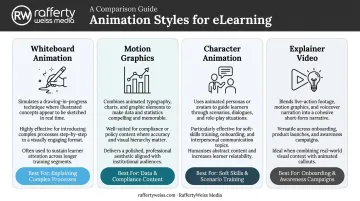
Whiteboard Animation
Simulates a hand drawing visuals on screen while a voiceover narrates. The progressive reveal mirrors how humans process sequential information, which makes it effective for process walkthroughs, policy overviews, and compliance summaries. It's also among the more cost-efficient formats to produce.
Motion Graphics
Animated text, data visualizations, icons, and charts. Best suited for statistics-heavy, technically abstract, or regulation-driven content where precision matters more than character-driven narrative. Motion graphics align well with Mayer's signaling principle: motion draws attention to structure rather than decorating the screen.
Best for: data-heavy compliance content, regulatory overviews, abstract technical concepts
Character Animation
Animated personas acting out workplace scenarios. The Learning Guild identifies this as the strongest format for social and emotional learning objectives: soft skills, DEI, harassment, ethics, and conflict resolution. Characters allow learners to observe consequences safely before facing similar situations in real life.
Best for: soft skills training, ethics scenarios, DEI and harassment prevention courses
Explainer Videos
Short, single-topic productions combining voiceover with simplified visuals. Ideal as course openers, product introductions, or onboarding primers. The goal is orientation, not deep training: explainers answer "what is this and why does it matter" before a longer learning journey begins.
15+ Animated E-Learning Video Examples by Use Case
The examples below represent a range of animation styles, industries, and training objectives. Where public examples are available, direct links are included.
Quick-Reference: Animation Formats by Use Case
| Use Case | Primary Format | Key Advantage |
|---|---|---|
| Compliance & HR | Character-based scenarios | Abstract policy becomes observable behavior |
| Employee Onboarding | Character-led narrative | Controls pacing; reduces new hire anxiety |
| Technical & Product | Motion graphics + UI overlay | Precision without filming actual systems |
| Safety & Regulatory | Scenario animation | Depicts hazards without real-world risk |
| Soft Skills | Character perspective scenarios | Enables comparison and perspective-taking |
Corporate Compliance & HR Policy Training
Example 1: Harassment Prevention Training — EasyLlama EasyLlama's harassment prevention sample is a character-based compliance module addressing workplace harassment policy. Character animation is the right call here: abstract policy language becomes concrete when learners watch scenarios unfold, see the wrong behavior modeled, and then observe a corrected version. The format also creates emotional distance — learners engage with the characters rather than feeling accused.
Example 2: Conflicts of Interest — ComplianceWave ComplianceWave's Compliance Brief on Conflicts of Interest uses scenario-based animation to make ethics policy tangible. The structure — showing both the problematic behavior and the correct path — is a well-established approach in compliance training. Abstract guidance about "avoiding conflicts" is far less memorable than watching a character navigate the same decision badly, then correctly.
Example 3: Anti-Corruption Policy — Motion Graphics Example This anti-corruption and business integrity video demonstrates how motion graphics handle regulatory content. Animated policy text, data overlays, and voiceover communicate compliance requirements without actors or elaborate storylines. For frequently updated regulatory content, this approach is practical — changing a text animation costs far less than reshooting a scene.
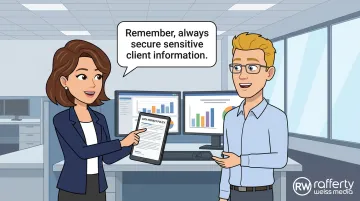
RaffertyWeiss Media has produced compliance animations along similar lines, including a workplace harassment refresher for Grace Hill that required careful handling of both legal precision and interpersonal sensitivity.
Employee Onboarding & Company Culture
Example 4: New Hire Orientation — Vyond Demo Vyond's employee training examples page includes animated onboarding samples that introduce company values, org structure, and day-one logistics. The format works because it controls pacing — new hires absorb information in digestible segments rather than sitting through a 45-minute in-person session that dumps everything at once.
Example 5: Character-Led First-Day Simulation Vyond's onboarding guidance showcases character-driven videos that simulate early workplace scenarios: meeting a manager, navigating team dynamics, understanding unwritten norms. This approach reduces new hire anxiety by making the unfamiliar feel familiar before the first day arrives.
Example 6: DEI and Belonging — eLeaP eLeaP's Diversity and Inclusion animated course uses narrative character design to communicate inclusion values. Inclusive representation in character design — diverse skin tones, gender presentations, and professional roles — signals organizational values more effectively than a written policy ever could. Learners notice who is and isn't represented.
Technical & Product Training
Example 7: Software and Product Training — Vyond Solutions Vyond's training and e-learning solutions page demonstrates how motion graphics and animated UI overlays simplify multi-step software processes. A three-minute animated walkthrough of a CRM workflow communicates more clearly than a 20-page written guide — and employees can pause, rewind, and revisit it on demand.
Example 8: HAZWOPER Technical Safety Animations HAZWOPER-OSHA's animated training playlist covers technically complex topics including confined spaces, hazard communication, and regulatory procedures. This is a clear example of animation solving a location problem: training on confined-space entry procedures doesn't require filming inside an actual confined space.
Example 9: Hybrid Animation for Software Adoption Pairing a character-led narrative with animated UI overlays works particularly well for software adoption training. The character provides motivation ("here's why this matters"); the UI overlay provides technical precision ("here's exactly what to click"). Each layer handles what the other can't.
Safety & Regulatory Training
Example 10: Hazard Communication and Safety This hazard communication training video demonstrates how animation handles dangerous workplace scenarios that would be impractical to film: chemical spills, equipment failure, improper handling procedures. Depicting the consequences of a safety violation on screen — without any real-world risk — is one of animation's strongest instructional advantages.
Example 11: CYBERTO! Cybersecurity Awareness — usecure usecure's CYBERTO! animated series uses character-based scenarios to simulate phishing attacks, social engineering, and data handling mistakes. The animated format creates stakes — learners watch a character get compromised and understand the consequences — without exposing the organization to any actual threat.
Example 12: Emergency Evacuation Training Custom Animation's emergency evacuation video models the exact safety procedures employees should follow, scene by scene. For large or distributed workforces, animated safety training ensures every employee receives identical procedural instruction — not a version that varies by trainer, location, or shift.
Soft Skills & Leadership Development
Example 13: Giving Effective Feedback — Character Scenarios This effective feedback demo video uses animated character scenarios to show the difference between feedback that lands well and feedback that doesn't. The "wrong approach vs. right approach" structure creates a direct comparison that lectures cannot — learners see both paths and their downstream effects.
Example 14: Resolving Workplace Conflict This workplace conflict resolution video illustrates how character animation enables perspective-taking. When learners watch a conflict unfold from multiple viewpoints — not just one character's — they build understanding of how the same interaction reads differently to different people. Static formats can describe this dynamic; animation demonstrates it.
Example 15: Emotional Intelligence — HSI HSI's emotional intelligence training video on Vimeo shows how scenario-based animation builds empathy by depicting the downstream impact of a choice on a team or colleague. A lecture can tell employees why emotional intelligence matters. Animation shows them what happens when it's absent, and that distinction drives behavioral transfer in a way abstract instruction rarely does.
What Separates Effective E-Learning Animations from Average Ones
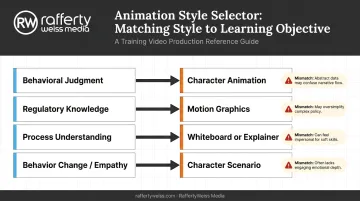
Match Style to Objective
The CYBERTO! cybersecurity series (Example 11) demonstrates this clearly: character animation is exactly right for phishing and social engineering scenarios because the instructional goal is behavioral judgment, not just factual recall.
Had the same content been produced as motion graphics with data overlays and text animations, it would communicate policy but fail to create the emotional engagement that actually changes behavior.
Mismatching style to objective is the most common production error in e-learning animation. Character animation for a regulatory data summary wastes production budget on emotional infrastructure the content doesn't need. Motion graphics for a harassment scenario strip out the human element the topic requires.
Script Discipline
The most effective animated e-learning videos commit to one clear learning objective per module. Compressing multiple lessons into a single video is tempting, but it produces content that confuses rather than instructs. Tight scripting — where visual elements reinforce rather than duplicate the narration — is the clearest sign of professional production quality.
Accessibility as Standard
Not an add-on. Corporate and government clients expect all four of these by default:
- Closed captions for every module
- Audio descriptions for visual-only content
- Inclusive character representation
- Screen-reader-compatible delivery formats
Missing any of these signals production immaturity and creates legal exposure for organizations operating under Section 508 or WCAG 2.1 requirements.
Visual Consistency Across a Series
When animated training videos share a unified character design, color palette, and voiceover style, learners build familiarity quickly. RaffertyWeiss Media's AARP SmartDriver series — 20 short training videos delivered in five languages — demonstrates this: consistent visual design across the series earned it a Best Video Design recognition from Design Rush and supports use in both instructor-led and standalone training contexts.
How to Source or Commission Animated E-Learning Videos
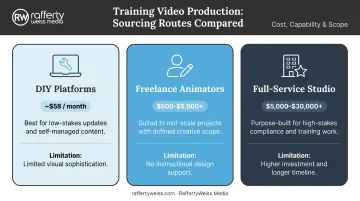
Three Sourcing Routes
| Route | Best For | Typical Cost Range | Key Limitation |
|---|---|---|---|
| DIY platforms (Vyond, Powtoon) | Frequent, low-stakes updates | From ~$58/month (Vyond Starter) | Limited visual sophistication; requires strong internal creative direction |
| Freelance animators (Upwork, Fiverr) | Flexible, mid-scale projects | $500–$5,000+ per project (Upwork estimates) | No instructional design support; quality varies significantly |
| Full-service studio | High-stakes, compliance-critical, large audiences | $5,000–$30,000+ per module | Higher investment, longer timeline |
What to Evaluate in a Production Partner
- Subject matter experience: can they handle federal policy, compliance, healthcare, or technical content accurately — not just make it look good?
- Instructional design capability: do they shape the learning objective, or just animate what you hand them?
- Delivery in the formats you need: MP4, SCORM, xAPI, captioned versions, and LMS-ready packaging for platforms like Cornerstone, Docebo, or Articulate 360
- Accessibility compliance with Section 508 and WCAG 2.1 — non-negotiable for government and healthcare work
RaffertyWeiss Media covers each of these areas in-house — instructional design, scripting, animation, voiceover, accessibility, and LMS delivery — for clients including Lockheed Martin, Georgetown University, and the American Red Cross. Every step stays with the same team, from brief to final delivery.
When Professional Production Is Worth It
Outsourcing to a full-service studio makes the most sense when:
- The video will reach a large, diverse, or distributed audience
- Accuracy and compliance with legal or regulatory standards are critical
- The video serves as a flagship element of onboarding or a high-stakes training program
When the stakes are that high, cutting corners on production typically costs more in rework, retraining, or reputational damage than it saves upfront.
Frequently Asked Questions
How much does a 2-minute animated video cost?
Costs vary by animation style and production level. DIY platforms like Vyond start around $58/month (subscription), freelance projects on Upwork run roughly $500–$5,000 depending on complexity, and professional studio production typically starts at $5,000 per module with costs scaling based on character complexity, custom voiceover, and accessibility requirements.
What type of animated video is best for corporate e-learning?
There's no single best type. Character animation suits soft skills, compliance, and DEI scenarios where emotional engagement drives behavior change. Motion graphics and explainer videos work better for technical, data-heavy, or process-oriented content where conceptual clarity is the goal.
How long should an animated e-learning video be?
ATD research supports 2–5 minutes for microlearning; Panopto's 2024 survey found structured enterprise training often runs 6–15 minutes depending on organization size. For longer topics, break content into a series of shorter modules rather than extending a single video.
What's the difference between motion graphics and character animation in e-learning?
Motion graphics animate text, data, icons, and graphic elements to explain concepts visually. Character animation uses personas to act out human scenarios. The key distinction is emotional engagement: choose motion graphics for conceptual understanding, character animation for behavior change.
Can animated videos be used for government and compliance training?
Yes. Animated video depicts sensitive or dangerous scenarios safely, ensures consistent delivery across distributed workforces, and updates cost-effectively when regulations change. For federal clients, Section 508 compliance — captions, audio description, and accessible formats — is a standard production requirement.
How do I choose between building animated e-learning videos in-house and outsourcing?
In-house tools work for frequent, low-stakes updates. Outsourcing makes more sense when training is high-visibility, regulatory in nature, or represents the organization to a large external audience — production quality directly affects learner trust and, in compliance contexts, organizational credibility.