The catch? Recording a video is easy. Creating one that actually changes behavior, meets compliance requirements, and reflects your organization's standards is a different undertaking entirely.
This guide covers everything you need to know: what eLearning videos are, why they work, the main formats, how to produce them effectively, and when it makes sense to bring in a professional team.
Key Takeaways
- 83% of employees prefer video for instructional content, making it a primary training format
- Well-designed multimedia improves knowledge transfer through coordinated visuals, narration, and managed cognitive load
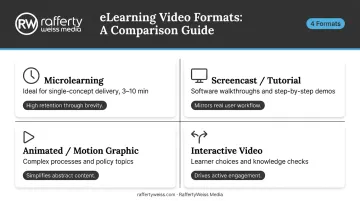
- Four main formats — microlearning, screencast/tutorial, animated, and instructional/interactive — each serve different training needs
- Effective production requires clear learning objectives, tight scripting, high audio quality, and accessibility standards
- Compliance, government, healthcare, and onboarding training demand professional production to protect accuracy and credibility
What Are eLearning Videos?
eLearning videos are purpose-built digital video content designed to teach, train, or inform — structured around defined learning objectives rather than entertainment or marketing goals. The distinction matters: a product demo video might show what software does, but an eLearning module teaches someone how to use it, assesses understanding, and fits within a broader training pathway.
eLearning videos function in several ways:
- Standalone training modules — self-contained lessons accessed directly by learners
- LMS components — video assets within a Learning Management System, paired with quizzes and progress tracking
- Blended learning supplements — video content that extends or reinforces in-person or live instruction
The range of organizations using them is broad:
- Corporations — onboarding, compliance training, and internal skills development
- Federal agencies — policy communication and regulatory education
- Universities — full online courses built around video-based instruction
- Healthcare organizations — clinical staff training on protocols and procedures
The format scales in ways live instruction can't — the same video reaches one learner or ten thousand, with the same quality and consistency every time.
Why eLearning Videos Work: The Science Behind the Impact
Video-based training outperforms text-only instruction for one reason: cognitive science supports it.
Multimedia Learning and Cognitive Load
Richard Mayer's research on multimedia learning shows that people learn more effectively from words and pictures together than from words alone, reporting a median effect size of 1.39 on transfer tests for multimedia instruction. The mechanism is Cognitive Load Theory: when learners receive coordinated visuals and narration, working memory handles two channels simultaneously rather than overloading a single one. The result is better processing and better retention.
This is why well-designed eLearning video outperforms text-only training — not because of the format itself, but because of how the format, when done correctly, manages how information reaches the brain.
One important note: the widely circulated "95% vs. 10% retention" statistic has no verified primary source. Researchers have traced it back to unsupported claims. Stick to the actual evidence, which is compelling enough on its own.
Scalability and Behavioral Modeling
Two additional advantages are worth naming clearly:
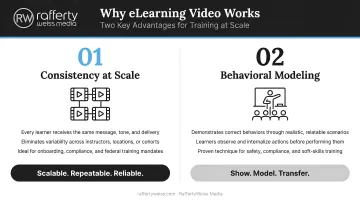
- Consistency at scale — a professionally produced training video delivers the same message, tone, and accuracy to 10 employees or 10,000. Live instruction varies. Video doesn't.
- Behavioral modeling — video allows learners to observe procedures being performed correctly, which is essential for safety training, clinical skills, and compliance demonstrations. Text cannot replicate this.
On-Demand Learning Meets Learner Preference
LinkedIn Learning data shows that 58% of employees prefer to train at their own pace and 57% expect to access training on a just-in-time basis. Video aligns naturally with both — learners can pause, rewind, and return to specific sections when they need them, rather than scheduling time around an instructor.
From a business perspective, the operational benefits are equally concrete:
- Reduces reliance on repeated live sessions, cutting long-term delivery costs
- Produces measurable gains in completion rates and time-to-competency
- Scales across geographies without additional instructor overhead
Types of eLearning Videos
Microlearning Videos
Microlearning videos are short, focused clips (typically 3 to 10 minutes) that address a single concept or skill. Their strength is fit: a five-minute module on one compliance requirement slots naturally into a workday in a way a 45-minute course never will.
They work particularly well for:
- Just-in-time training (a quick refresher before a specific task)
- Single policy updates or procedure changes
- Reinforcing content from longer training programs
One caveat: short alone doesn't guarantee effective. A two-minute video that covers three concepts is no better than a long one. The discipline is one objective per clip, not just short clips.
Tutorial and Screencast Videos
Screencast and tutorial videos show exactly what to do — either by recording software walkthroughs or demonstrating physical tasks on camera. For IT onboarding, software training, and procedural skills, this format eliminates the ambiguity that written instructions create. Learners see the clicks, the screens, the steps, in real time.
The show-don't-tell format reduces misunderstanding and call volume, especially useful when rolling out new systems to distributed teams.
Animated and Motion Graphic Videos
Animation works best when live footage either can't capture the concept or would be prohibitively expensive. Topics that suit this format include:
- Complex multi-step processes that can't be filmed directly
- Policy frameworks and compliance topics requiring visual structure
- Data-heavy subjects that benefit from charts and motion graphics
- Abstract ideas where illustrated explainers outperform live footage
RaffertyWeiss Media has produced animated eLearning content for organizations like AARP, including the Smart Driver Course, recognized for its clarity and visual effectiveness.
One common mistake: low-budget animation signals low investment in the training program. Credibility transfers from production quality to content credibility, particularly for federal agencies and professional associations.
Instructional and Interactive Videos
Instructional Videos
Instructional videos feature subject matter experts or on-camera hosts delivering content directly — common for onboarding, policy communication, or professional development. Done well, they convey authority and establish trust. Done poorly, they're exactly what people fast-forward through.
Interactive Videos
Interactive videos go further: learners make choices, answer embedded quiz questions, or navigate branching scenarios. This format turns passive watching into active engagement, which is measurably better for retention and knowledge transfer.
How to Create Effective eLearning Videos
Step 1: Define Learning Objectives and Know Your Audience
Every downstream production decision flows from two questions: What should the learner be able to do after watching this? and Who exactly is watching?
A compliance training video for federal employees and a software onboarding video for new hires may both be "eLearning," but they require entirely different tones, depths, formats, and accessibility standards. Get specific before writing a single word of script.
Clear objectives also keep videos focused. Without them, scripts drift, videos run long, and learners disengage.
Step 2: Build a Storyboard and Write a Tight Script
A storyboard sequences content, visuals, and narration before production begins. Its main value is catching problems early: pacing issues, visual gaps, transitions that don't land — all easier to fix on paper than in the edit bay.
For the script:
- Write conversationally, not academically
- Keep sentences short
- One idea per sentence, one concept per video
- Anticipate learner questions and answer them proactively
Density is the most common script mistake. Three minutes can hold one concept well — or six concepts poorly.
Step 3: Prioritize Production Quality
The bar learners apply to training video is the same one they apply to everything else they watch. Poor audio is the top reason viewers stop watching — TechSmith's research found that 35% of workplace viewers say high-quality, easy-to-hear narration keeps them engaged, while poor audio and blurry footage tied as the top quality deal-breakers.
For compliance content, public health training, and government communications, production quality directly affects credibility. Amateurish execution signals that the message itself isn't worth attention.
Core production elements to get right:
- Clean, professionally recorded audio
- Well-lit, stable framing
- Polished post-production editing
- On-brand graphics and motion
Step 4: Match Length to the Learning Task
There's no universal rule, but there are useful defaults:
- Microlearning / job aids: 3–10 minutes
- Standard instructional modules: 10–19 minutes
- Complex skill-based training: longer formats work when structured with chapters, checkpoints, and practice
TechSmith's data shows 60% of workplace learners won't watch a video over 20 minutes in general — but 67% will watch one over 60 minutes when they're actively trying to learn a new job skill. Intent matters more than length rules.
Step 5: Build In Interactivity and Accessibility
Interactivity transforms passive video into active learning. Even simple additions make a difference:
- Embedded knowledge checks at timed intervals
- Branching scenarios that respond to learner choices
- Chapter markers for navigation
- Clickable hotspots on specific visual elements
Accessibility is a legal requirement for most of RaffertyWeiss Media's core clients — not a best practice to revisit at the end of production. For federal clients, the U.S. Access Board's Revised Section 508 Standards require user controls for closed captions and audio descriptions in any video with synchronized audio. For government, higher education, and healthcare organizations, this is a legal requirement — not a best practice.
Standard accessibility requirements include:
- Closed captions for all video content
- Transcripts for audio-only content
- Audio descriptions for visual content where meaning would otherwise be lost
- Mobile-friendly formatting and accessible player controls
RaffertyWeiss Media builds Section 508 compliance into every government production from the start — including projects for the Department of Education, CMS, and SAMHSA — rather than treating it as a post-production correction.
Best Practices for eLearning Video Success
Visual and tonal consistency matters more than most teams realize. When videos are produced over time or by different crews, inconsistency erodes credibility. Standardized intros and outros, consistent color palettes, on-brand graphics, and a unified narration style help learners navigate content intuitively — and signal professionalism throughout your training library.
Training videos go stale fast. When policies change or software updates, yesterday's accurate tutorial becomes today's liability. A quarterly or annual review cycle — tracking completion rates, drop-off points, and assessment scores — identifies underperforming or outdated content before it actively misleads learners.
Mobile access is no longer optional. L&D teams are expanding mobile training delivery, and learners increasingly expect content in the flow of work — not just at a desktop. Before deployment, run through these checks:
- Test on multiple device sizes before deployment
- Use high-contrast visuals that read clearly on small screens
- Center critical content in the frame
- Compress file sizes without sacrificing resolution
When to Partner with a Professional Video Production Company
DIY tools are fine for quick screencasts and internal knowledge-sharing. When training content represents your organization publicly, carries legal or compliance weight, or needs to reach hundreds or thousands of learners reliably, the stakes are different.
Professional production investment pays off in specific scenarios:
- Large-scale employee onboarding programs
- Federal agency communications and compliance training
- Public health campaigns with broad audience reach
- Regulatory or legal training where accuracy is non-negotiable
- Executive-led messaging that reflects organizational leadership
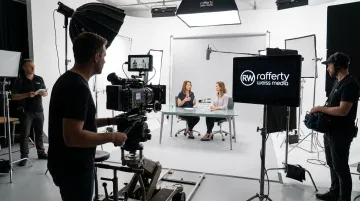
Professional producers bring more than cameras. Strategic planning, instructional design, scripting expertise, professional audio engineering, motion graphics, and Section 508 compliance all determine whether a video actually performs as a training tool.
Organizations like the American Red Cross, Lockheed Martin, Georgetown University, and HealthCare.gov have relied on RaffertyWeiss Media's 25+ years of video production expertise for training and communication content that meets the standards those names demand.
Their work spans LMS-ready eLearning modules, government compliance training, animated explainer series, and bilingual training content, all produced in-house from scripting through final delivery.
Professional production has upfront costs. A well-produced video that doesn't require reshoots and trains employees effectively on first deployment, however, delivers stronger long-term value than repeated low-quality attempts. Custom eLearning modules typically range from $5,000 to $30,000 depending on format, length, and complexity — which is a fraction of the cost of repeated live instruction sessions at scale.
If you're evaluating your organization's eLearning video needs, reach out to RaffertyWeiss Media to discuss scope and approach.
Frequently Asked Questions
What are eLearning videos?
eLearning videos are purpose-built digital content designed to teach, train, or inform — structured around defined learning objectives rather than entertainment or marketing goals. They're deployed within learning management systems, corporate intranets, or standalone training platforms to drive specific knowledge or behavior outcomes.
Where can I find educational videos?
For general learning, platforms like YouTube, Coursera, Khan Academy, and TED-Ed offer broad public libraries. For professional organizational training, eLearning videos are typically produced in-house, commissioned from a production company, or sourced from specialized eLearning content libraries tailored to specific industries or compliance requirements.
How long should an eLearning video be?
Microlearning and job-aid videos work best at 3–10 minutes; standard instructional modules typically run 10–19 minutes. Each video should cover a single concept — shorter, focused videos consistently achieve higher completion rates.
What's the difference between eLearning videos and classroom training?
eLearning videos are on-demand, self-paced, and scalable to any number of learners — delivering consistent content every time. Classroom training is time-bound, location-dependent, and subject to instructor variability. For repeatable instruction — onboarding, compliance, safety — video is the more efficient and cost-effective choice.
What types of organizations use eLearning videos?
Corporations, federal agencies, nonprofits, universities, and healthcare organizations all rely on eLearning video — for employee onboarding, compliance training, safety orientation, software adoption, customer education, and professional development.
How much does it cost to produce a professional eLearning video?
Costs vary by format, length, and complexity. A single on-camera training module typically runs $5,000–$12,000; animation-heavy or interactive modules with branching scenarios run higher. Contact a production company directly for an accurate project estimate.