Video-based eLearning is now the dominant format reshaping how people learn at work. According to Training Magazine's 2024 Training Industry Report, 79% of organizations use virtual classrooms, webcasting, or video broadcasting as part of their training delivery. That number isn't a trend — it's a baseline.
This article covers what video-based eLearning actually is, why the science supports it, the formats that work best for different training goals, and where the medium is heading next.
Key Takeaways
- Video-based eLearning uses recorded, live, or interactive video to deliver structured learning that combines visuals, audio, and instructional design.
- Mayer's Multimedia Learning research confirms it: combining words and pictures produces better retention than either format alone.
- Common formats range from animated explainers and screencasts to live-action modules and interactive branching scenarios.
- Scales across distributed teams, supports remote workforces, and produces measurable performance data — making it a practical choice for most organizations.
- AI-personalized video, immersive formats, and workflow-embedded job aids are defining the next generation of workplace learning.
What Is Video-Based eLearning?
Video-based eLearning is any structured learning experience where video is the primary delivery medium. That includes pre-recorded modules, live-streamed instruction, and interactive video with embedded quizzes or branching scenarios.
The distinction that matters: video-based eLearning isn't just watching YouTube. It's intentional. Every format decision — visuals, narration, pacing, on-screen text — serves a specific learning objective. That intentionality is what makes it a training tool, not just content.
How It Differs from Traditional eLearning
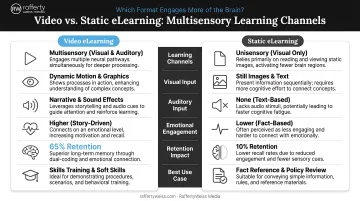
Traditional eLearning typically means slide-based modules, PDFs, or static LMS content. It works — but it operates on a single channel. Learners read text or view still images; the experience is sequential and often passive.
Video adds a multisensory layer that static formats can't replicate:
- Shows processes in motion rather than describing them in text
- Conveys tone and nuance through voice that written content flattens out
- Places learners in realistic scenarios through visual storytelling
- Reinforces key points with on-screen text and graphics in real time
That multisensory combination is why video consistently outperforms static formats on both engagement and knowledge retention. Federal agencies, corporations, and universities have all moved toward video-first training for the same reason: learners remember what they experience, not just what they read.
Why Video-Based Learning Works: The Science Behind It
Decades of cognitive science research explain precisely why video outperforms most other instructional formats — and the findings are consistent across hundreds of studies.
Mayer's Multimedia Learning Principle
Psychologist Richard Mayer spent years studying how people process instructional content. His core finding, detailed in Multimedia Learning (Cambridge University Press, 2009), is that people learn more deeply from words and pictures combined than from words alone. He tested this across 93 experimental comparisons — and the result was consistent.
For eLearning designers, this means video's combination of narration, visuals, and on-screen text isn't just more engaging. It's cognitively more effective.
The Dual-Channel Advantage
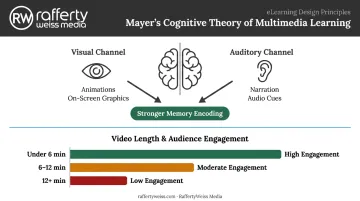
Mayer's Cognitive Theory of Multimedia Learning identifies two separate processing channels in the brain: one for visual/pictorial information, one for auditory/verbal information. Well-designed video engages both simultaneously.
When a learner watches an animated explainer with narration, the brain uses two distinct pathways to encode the same information simultaneously. That parallel processing creates stronger memory traces than a single-channel medium like a text document.
Short Videos and Cognitive Load
Research published in CBE Life Sciences Education reviewed MOOC video engagement data and found that median engagement time drops significantly for longer videos — with the strongest engagement occurring in videos under six minutes.
The reason is working memory capacity. Long videos covering multiple objectives exceed what the brain can actively process at once, which reduces retention. Short, focused videos map to a single objective — keeping cognitive load within the range where learning actually sticks.
Types of Video-Based eLearning Formats
No single format fits every training need. The right choice depends on the content type, audience, and learning objective.
Animated Explainer Videos
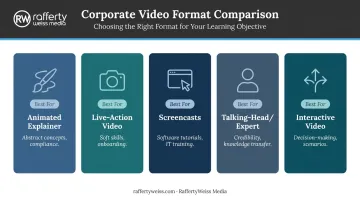
Animation works best for content that's abstract, sensitive, or difficult to demonstrate on camera (think compliance topics, process overviews, or regulatory concepts). It simplifies complex information through visual metaphor and maintains engagement without requiring on-camera talent. A 2016 meta-analysis in Computers & Education found that animation can improve learning outcomes compared to static graphics, particularly for procedural and conceptual content.
RaffertyWeiss Media produces animated eLearning content in-house — including 2D animation, character animation, motion graphics, and animated explainers — for clients like the Centers for Medicare and Medicaid Services, the Department of Education, and AARP. Their animated Smart Driver Course for AARP was named Best Video Design by Design Rush.
Live-Action Video
Real-person, scripted video is the right choice for soft skills training, onboarding, scenario-based compliance, and executive communications. Seeing actual people navigate realistic situations builds context and credibility that animation can't fully replicate.
Production quality matters here more than in any other format. Common issues that pull learners' attention away from the content include:
- Poor lighting that flattens subjects or creates harsh shadows
- Muffled or inconsistent audio
- Unstable camera work or misframed shots
For corporate and government audiences, these distractions signal a lack of seriousness about the subject matter.
Organizations producing live-action eLearning for high-stakes training often work with experienced production partners. RaffertyWeiss Media has over 25 years producing corporate and government video for clients including Lockheed Martin, Georgetown University, and the American Red Cross, with Section 508-compliant delivery built into the government production workflow as standard.
Screencasts and Software Tutorials
Screen recordings are the practical standard for software training and IT onboarding. They're relatively low-cost to produce, easy to update when interfaces change, and highly specific: showing exactly what learners need to do rather than describing it. RaffertyWeiss Media has produced screen-recorded tutorial content for clients including DC Public Schools and JBS International's EHR portal.
Talking-Head and Expert-Led Videos
Subject-matter experts on camera create a sense of credibility and connection that's difficult to replicate with animation or narrated slides. It's closer in feeling to a lecture or one-on-one session. These videos can also be sourced from existing recordings (repurposed webinars or internal presentations), reducing production cost while preserving the expert's authority.
Interactive Video
Branching scenarios and clickable in-video elements convert passive viewing into active decision-making. Research published in Emerald's 2025 workplace eLearning study identifies branching scenarios as particularly effective for tracking learner engagement and simulating real decisions over time. For compliance training, customer service scenarios, and leadership development, this format moves learners from knowing to practicing.
Key Benefits of Video-Based eLearning for Organizations
Scalability and Cost Efficiency
A single well-produced training video can reach hundreds or thousands of employees simultaneously — without scheduling conflicts, travel costs, or instructor fees. One client that transitioned from text-only modules to video-rich content saw completion rates increase by 30%. Another reduced onboarding time by 40% after upgrading their training videos with professional audio, clear graphics, and tighter scripting.
Flexibility for Remote and Hybrid Workforces
On-demand video lets learners access content when they actually need it, not when a session happens to be scheduled. That flexibility is especially valuable for geographically dispersed teams.
According to Training Magazine's 2024 report, 69% of companies plan to maintain their current balance of in-person and remote training. Video-based content has moved from convenient workaround to permanent infrastructure.
Accessibility Across Audiences
Video can be captioned, translated, and formatted for mobile without building a separate course. Captions have a measurable impact: research cited in PMC draws on more than 100 empirical studies confirming captions improve comprehension, attention, and memory — even for viewers without hearing difficulties. For federal clients, RaffertyWeiss Media builds Section 508 compliance, including closed captioning, audio description, and accessible file formats, into every government production from the start.
Measurable Performance Data
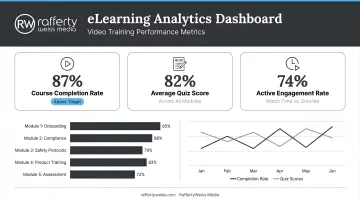
Video learning platforms generate analytics that traditional training simply can't match:
- Completion rates and drop-off points by module
- Time-on-task and replay behavior
- Quiz scores and knowledge check performance
- Comparative data across cohorts or departments
L&D teams can use this data to identify where learners disengage, which concepts require reinforcement, and whether the training is actually changing behavior.
Best Practices for Creating Effective eLearning Videos
Keep It Short and Focused
Each video should address one learning objective. Keep individual modules under 10 minutes — often closer to six. Complex topics belong in a sequenced microlearning series, not a single 45-minute course. According to TechSmith's 2024 Video Viewer Trends Report, 60% of viewers consider videos over 20 minutes too long, and that threshold drops sharply for training content competing with work demands.
Prioritize Production Quality
Clear audio is the single most important production variable. TechSmith's research found that 35% of viewers identified high-quality audio as a primary driver of engagement — and blurry footage or poor sound are among the top reasons they stop watching.
The standard to meet isn't a film production. It's clear, distraction-free delivery:
- External microphone, not built-in camera audio
- Stable, properly exposed image
- Clean background with no visual clutter
- Consistent branding and graphics
For evergreen or high-stakes training content, working with a professional production team pays off over the life of the asset. A well-produced module can serve an organization for years without needing to be rebuilt from scratch.
Build in Engagement and Interaction
Good production earns attention. Engagement keeps it. Effective eLearning video goes further by incorporating elements that require the learner to do something:
- Real-world scenarios and relatable characters that ground abstract concepts
- Text overlays, animated callouts, and b-roll that reinforce the narration visually
- Embedded knowledge checks, branching choices, and reflective prompts that require active response
These elements don't just hold attention. They create the active processing that converts watching into learning.
The Future of Video-Based eLearning
AI-Personalized Video
Emerging AI tools are enabling video content that adapts dynamically to individual learner performance. Rather than every employee watching the same module, AI can route learners to different scenarios, explanations, or follow-up content based on quiz results or prior history. According to Deloitte's December 2024 analysis, 54% of organizations using AI for learning operations reported significant cost savings and efficiencies. High-performing organizations are 19 times more likely to use AI for learning content design than low performers.
TechSmith's 2024 research adds a useful reality check: 75% of viewers were receptive to AI-assisted instructional video, but 90% still had concerns about accuracy. The technology is ready; the governance isn't always.
Immersive and Extended Reality
VR and AR are extending video-based learning into high-stakes simulations: surgical training, safety procedures, and complex equipment operations. Adoption is still limited — Training Magazine's 2024 report found VR accounts for just 7% of organizational usage and 0.3% of total training hours.
But the cost curve is moving. PwC's research found that VR reached cost parity with classroom training at 375 learners and became 52% more cost-effective than classroom instruction at 3,000 learners.
Video as Continuous Performance Support
The most significant shift is conceptual, not technological: video moving from a discrete training event to an always-available job aid. Instead of sitting through a compliance course once a year, employees search for a two-minute clip at the moment they need it — embedded in their workflow, accessible from their phone.
That shift shows up in how organizations are actually deploying video:
- Short how-to clips embedded directly in software tools or intranets
- Searchable video libraries replacing static policy documents
- Mobile-accessible walkthroughs for field and frontline workers
- Post-training reinforcement clips sent 30-60 days after onboarding
LinkedIn Learning's 2024 Workplace Learning Report found 47% of L&D teams planned to deploy microlearning programs in 2024. That's not just a format preference. It signals that the line between training and working is blurring — and it's not snapping back.
Frequently Asked Questions
What is video-based learning?
Video-based learning is a training method that uses live or pre-recorded video to teach skills and knowledge. It combines visuals, audio, and interactive elements to create a multisensory learning experience more engaging than text-only formats.
What are the 4 types of learning styles?
The VARK model identifies Visual, Aural, Read/Write, and Kinesthetic learning preferences. Video-based eLearning suits mixed audiences by incorporating visuals, narration, on-screen text, and interactive elements. Research indicates the real benefit comes from sound multimedia design — not from matching instruction to individual style preferences.
How is video-based eLearning different from traditional eLearning?
Traditional eLearning typically relies on slide-based or text-heavy modules delivered through an LMS. Video-based eLearning adds motion, audio, and visual storytelling — creating a more engaging, retention-friendly experience that draws on both visual and auditory processing channels.
How long should a video-based eLearning module be?
Under 10 minutes is the practical guideline, with many designers targeting six minutes or fewer per module. Complex topics should be broken into a sequenced microlearning series rather than packed into a single long video.
What types of video work best for corporate training?
- Animated explainers work best for abstract concepts, compliance, and regulatory content
- Live-action video suits soft skills training, onboarding, and scenario-based compliance
- Screencasts are the go-to format for software tutorials and IT onboarding
- Interactive video drives engagement for decision-making practice and leadership scenarios