Introduction
Corporate L&D teams face a real tension heading into 2026: the demand for animated training content keeps growing, but most organizations struggle to find tools that balance production quality, scalability, and brand consistency with what their training programs actually need.
Animated video makers for corporate training are purpose-built platforms, not generic video editors. They handle onboarding modules, compliance scenarios, software walkthroughs, and soft-skills content — each format placing different demands on the tool.
According to the LinkedIn 2025 Workplace Learning Report, 83% of companies plan to maintain or increase investment in career-driven learning, putting pressure on L&D teams to produce more content with the same resources.
Choosing the wrong platform wastes budget and slows production cycles. This guide covers the top animated video platforms for 2026, what each one does well, where it falls short, and how to match the right tool to your specific training format and team constraints.
Key Takeaways
- Animated video tools fall into distinct categories: character animators (Vyond), AI avatar platforms (Synthesia), and screen recorders (Camtasia) — each suited to different training formats
- Start with training type, not features — compliance, onboarding, software walkthroughs, and conceptual content all call for different tools
- Vyond and Synthesia lead for character-driven and presenter-style content; Camtasia is the standard for software training; VideoScribe works for whiteboard-style lessons
- For high-stakes, compliance-sensitive, or government-grade training, professional production often delivers better ROI than template-based tools
Why Animated Videos Are Essential for Corporate Training
Animation has become the default format for corporate training because it solves production problems that live-action can't. Distributed teams need consistent delivery across locations. Complex processes need simplification. Live-action requires scheduling, location logistics, and on-camera talent that most L&D teams can't sustain at scale.
The global corporate e-learning market was valued at $104.32 billion in 2024 and is projected to reach $334.96 billion by 2030, reflecting how central digital learning content has become to workforce development strategy.
Where Animation Has the Most Impact
Three training formats consistently benefit from animated video:
- Compliance and regulatory training — Scenarios need to be repeatable, auditable, and consistent across every employee who takes them. Animation removes the variability of live-action and makes updating content when regulations change far less expensive.
- Employee onboarding — Organizations with multiple locations or remote workforces need every new hire to receive the same foundational information. Animated onboarding modules deliver that consistency without requiring facilitators at every site.
- Soft-skills training — Character-driven storytelling improves retention over text-based or slide-heavy modules. Watching a scenario play out is more memorable than reading about it.
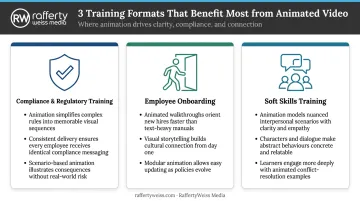
The tools that work best for compliance training differ from those suited to onboarding or soft-skills content — which is why format should drive your software selection, not the other way around.
Best Animated Video Makers for Corporate Training in 2026
Each tool below was selected based on its relevance to corporate training workflows: animation quality, ease of use, LMS compatibility, pricing transparency, and fit for enterprise or government use cases.
Vyond
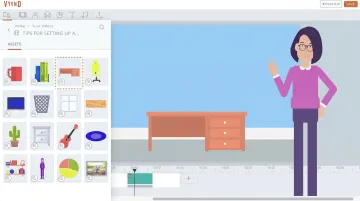
Vyond is one of the most widely adopted animated video platforms in corporate L&D. Its drag-and-drop character animation and extensive library of workplace-specific scenes, props, and expressions make it practical for building relatable training scenarios without a design background.
What sets Vyond apart for corporate use:
- Brand Management Suite keeps visuals consistent across distributed teams
- SCORM 1.2 and SCORM 2004.v4 export supports LMS integration (Enterprise and Agency plans)
- Vyond Go AI text-to-video generates editable draft videos from text prompts, scripts, PDFs, or PowerPoint files — significantly cutting production time for teams managing large training libraries
- 80+ language translation for on-screen text, scripts, and text-to-speech
- FedRAMP Certified (Package ID FR2433985791) for government use
| Key Features | Drag-and-drop character animation, Vyond Go AI text-to-video, SCORM 1.2/2004 export, Brand Management Suite, 80+ language translation, team collaboration |
| Best For | Soft skills, compliance scenarios, onboarding, and role-play-based training for corporate teams |
| Pricing | Starter: $58/month (annual) or $99/month; Professional: $100/user/month (annual) or $199/user/month; Enterprise: $137/user/month (annual); Agency: $167/user/month (annual) |
Note: The Essential plan was discontinued for new users as of May 7, 2025.
Synthesia
Synthesia specializes in AI avatar video for enterprise training. L&D teams can generate presenter-style videos using 150+ photorealistic digital humans in 160+ languages — no filming equipment, actors, or studio time required.
Key differentiators for corporate and government training:
- 1-Click Translation adapts existing videos into 80+ languages with automatic lip-sync (Enterprise)
- AI Dubbing with Lip Sync translates videos into 130+ languages while preserving the original speaker's voice
- Approval workflow and version control supports compliance review processes
- AI Screen Recorder (Chrome extension) combines avatar delivery with software demos
- SCORM 1.2 and SCORM 2004 export available on Enterprise
- SOC 2 Type II, GDPR, and ISO 42001 compliance certifications
| Key Features | 150–240+ AI avatars (varies by plan), 160+ language support, 1-Click Translation with lip-sync, SCORM export, AI Screen Recorder, brand templates, live collaboration |
| Best For | Scalable multilingual training, HR communications, DEI content, and executive or policy messaging for global enterprise teams |
| Pricing | Free: $0 (up to 10 min/month); Starter: $18/month (annual) or $29/month; Creator: $64/month (annual) or $89/month; Enterprise: custom pricing |
Note: SCORM export and Brand Kits are Enterprise-only features.
Camtasia
Camtasia combines screen recording with a full video editor, making it the go-to choice for organizations that train employees on software systems, internal tools, or step-by-step processes — situations where showing the actual workflow is more effective than illustrating it.
What makes Camtasia stand out for IT and software training:
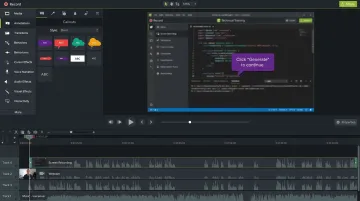
- 4K multi-track recording captures screen, webcam, and audio on separate tracks
- PowerPoint Add-In converts existing slide decks into polished training videos
- Interactive quizzes and SCORM export support eLearning engagement within LMS environments
- AI script generation and text-to-speech narration reduce production time
- Annotations, callouts, and sketch-motion graphics for step-by-step visual guidance
| Key Features | 4K screen recording, drag-and-drop timeline editor, PowerPoint integration, interactive quizzes, SCORM export, AI script and voiceover, annotations and callouts |
| Best For | Software walkthroughs, IT and systems training, instructor-led tutorial content, and technical onboarding for enterprise teams |
| Pricing | Starter: $39/year; Essentials: $179.88/year; Create: $249/year; Pro: $599/year; Teams & Business: contact sales |
Note: SCORM export is available from the Essentials plan and above. Confirm SCORM version compatibility directly with TechSmith during procurement.
Powtoon
Powtoon bridges the gap between presentation tools and full animation software. It's accessible for training coordinators, HR teams, and communications staff who need clean animated explainers quickly without a steep learning curve.
Powtoon's value for corporate training:
- Powtoon Imagine AI converts documents, decks, URLs, and prompts into complete animated videos (PDF, Word, and PowerPoint supported)
- Character lip-sync automatically syncs mouth movements to uploaded audio or AI text-to-speech (Advanced plan)
- PowerPoint import supports up to 100 MB files
- Canvas LMS integration confirmed; MP4 export available from Lite plan upward
| Key Features | Slide-based drag-and-drop editor, Powtoon Imagine AI doc-to-video, character lip-sync, brand management, PowerPoint import, LMS/MP4 export |
| Best For | Training summaries, microlearning modules, internal communications, and onboarding explainers for SMBs, non-profits, and government teams |
| Pricing | Free: $0 (watermarked, 3 min); Lite: $15/month (annual); Professional: $40/month (annual); Advanced: $125/month (annual); Enterprise: custom pricing |
Note: SCORM package export was not confirmed on official Powtoon pages. Verify LMS tracking requirements before purchasing.
VideoScribe
VideoScribe is a dedicated whiteboard animation tool that turns complex concepts into hand-drawn visual stories. It works particularly well for compliance training, policy explanations, and conceptual topics where clarity matters more than production polish.
VideoScribe's differentiators for corporate training:
- 5M+ royalty-free images on premium tiers for rapid asset sourcing
- AI script and voiceover generation in 45+ languages reduces production time
- Multiple animation styles — draw, pulse, fade, bounce, spin, and shake — allow trainers to tailor pacing to content complexity
- Camera movement controls support zooming and panning for visual storytelling emphasis
- Available as both browser-based and downloadable desktop application
| Key Features | 5M+ asset library, AI script and voiceover generation, 45+ language support, multiple animation styles, camera movement controls, desktop and browser-based |
| Best For | Compliance training, policy explainers, safety briefings, and conceptual topic training where simplicity and narrative clarity are priorities |
| Pricing | Lite: $12.50/month (annual, $150/year); Core: $18.75/month (annual, $225/year); Max: $23.33/month (annual, $280/year); Teams: contact sales |
Note: SCORM export was not confirmed on official VideoScribe pages. Use with a separate LMS packaging tool or confirm requirements with VideoScribe sales.
How to Choose the Right Animated Video Maker for Your Organization
Match the Tool to Your Training Format
The most common mistake organizations make isn't choosing the wrong tool — it's choosing the wrong format category entirely.
- Character animation (Vyond) → soft skills, compliance scenarios, onboarding
- AI avatar platforms (Synthesia) → high-volume, multilingual presenter-style content
- Screen recording (Camtasia) → software walkthroughs, IT training, process documentation
- Whiteboard animation (VideoScribe) → conceptual topics, policy explanations, safety briefings
- Slide-based animation (Powtoon) → microlearning, training summaries, internal communications
Verify LMS and SCORM Compatibility Before You Buy
Vendor marketing claims and actual LMS integration are two different things. Before committing:
- Confirm whether the tool exports SCORM 1.2 or SCORM 2004 — or both
- Request a test package and upload it to your actual LMS (Canvas, Moodle, Cornerstone, SAP SuccessFactors) before purchasing
- Ask specifically about xAPI/Tin Can support if you need granular learner analytics beyond completion tracking
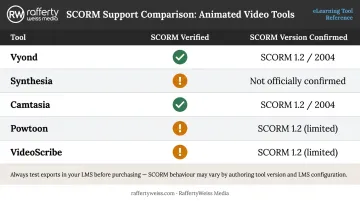
Quick reference — verified SCORM support:
| Tool | SCORM Verified | Version Confirmed |
|---|---|---|
| Vyond | ✅ Enterprise/Agency | SCORM 1.2 and 2004.v4 |
| Synthesia | ✅ Enterprise | SCORM 1.2 and 2004 |
| Camtasia | ✅ Essentials+ | Version not officially stated |
| Powtoon | ⚠️ Not verified | Not confirmed |
| VideoScribe | ⚠️ Not verified | Not confirmed |
Factor in Real Cost of Ownership
Subscription price is only part of the equation. Consider:
- Per-seat pricing for team accounts vs. single-user plans
- Credit systems — Vyond and Synthesia both use credit-based AI features with limits by plan tier
- Production time — a $40/month tool that takes 20 hours per module has a very different real cost than a $100/month tool that produces the same output in 4 hours
- Team skill gap — drag-and-drop tools like Powtoon and VideoScribe require minimal training; AI-first platforms require script quality and brand governance inputs upfront
These cost variables matter most at the high end of the spectrum. For regulated compliance, government-grade, or enterprise training where accuracy and brand integrity are non-negotiable, the real question isn't which DIY tool to choose — it's whether professional production delivers better long-term value than in-house tool subscriptions ever could.
Conclusion
The best animated video maker for corporate training in 2026 is the one that matches your training format, integrates cleanly with your learning systems, and can be sustained by your team without sacrificing quality over time. No single tool wins on every dimension.
DIY platforms have improved significantly and work well for standard content at reasonable volume. But organizations managing high-volume, compliance-sensitive, government, or enterprise training often find that the accuracy, brand alignment, and strategic messaging their programs require exceed what template-based tools can reliably deliver.
For those programs, professional production addresses the gaps that templates can't. RaffertyWeiss Media has spent over 25 years producing training and communications content for federal agencies (including the Department of Education, SAMHSA, and the Centers for Medicare & Medicaid Services), major corporations (Lockheed Martin, Amtrak, Fannie Mae), and associations (AARP, American College of Cardiology).
Their in-house team handles everything from instructional design and scripting through animation, motion graphics, and voiceover — including Section 508-compliant eLearning modules compatible with SCORM, xAPI, Cornerstone, Docebo, and Articulate 360.
Next steps worth taking before you commit:
- Identify your training format and LMS requirements first
- Test shortlisted tools with real training content before subscribing
- If your program involves compliance-critical, government, or enterprise-grade content, contact RaffertyWeiss Media to discuss whether professional production is the right fit — call 301-922-5405 or reach out through their website to schedule a strategy conversation
Frequently Asked Questions
What is the best animated video maker for corporate compliance training?
Vyond and Synthesia are the strongest options for compliance training — Vyond for character-driven scenario-based content with SCORM export, Synthesia for multilingual presenter-style delivery with approval workflows. For accuracy-critical or legally sensitive compliance content, professional production oversight often makes sense to ensure messaging precision.
Do animated video tools support LMS and SCORM integration?
Most enterprise-grade tools do — Vyond and Synthesia both support SCORM 1.2 and 2004 export at their enterprise tiers, and Camtasia includes SCORM export from the Essentials plan. Always test the exported package in your actual LMS before purchasing, since vendor compatibility claims don't guarantee smooth integration with every platform.
How much does it cost to create animated training videos?
Subscription costs range from free tiers with watermarks to $15–$125/month for professional plans and custom enterprise licensing. Production time and team skill level affect real cost as much as the subscription price — a tool requiring 15 hours per module can be more expensive in practice than a pricier one that cuts that to 3 hours.
Can I create animated training videos without any design or animation experience?
Drag-and-drop platforms like Powtoon, VideoScribe, and Vyond are designed for non-designers. AI-powered platforms like Synthesia require only a script. Output quality and brand consistency do improve with some instructional design input, especially for compliance or enterprise-grade content.
What is the difference between using a DIY animated video tool and hiring a professional video production company?
DIY tools offer speed and cost savings for standard content. Professional studios bring custom scripting, instructional design, voiceover, motion graphics, LMS-compatible delivery, and Section 508 compliance. That gap matters most for high-stakes, government-mandated, or enterprise training where accuracy and brand integrity are non-negotiable.
How long does it take to produce an animated corporate training video?
AI-powered tools can generate a draft in minutes; character animation typically takes hours to days depending on complexity. Custom professional production runs longer: a full eLearning module at RaffertyWeiss Media typically takes 4–8 weeks from kickoff to delivery, with federal agency projects extending further due to review requirements.