A well-produced highlight video changes that equation. According to PCMA, event content relevance can last anywhere from three weeks to three years depending on how it's packaged and distributed. A highlight video is one of the most efficient ways to extend that shelf life — turning a single event into a promotional asset, a sponsor deliverable, and an internal communications tool.
The concept sounds straightforward. In practice, the gap between a forgettable clip reel and a video that genuinely drives future attendance or sponsor interest comes down to three things: planning before the event, disciplined capture on the day, and smart editorial choices in post.
This guide covers all three.
Key Takeaways
- A conference highlight video is a 1–5 minute edited video capturing key speakers, audience energy, and defining event moments
- Strong videos balance emotional hooks (candid reactions, applause) with informational anchors (speaker names, event stats)
- Pre-production planning (shot lists, interviews, clear goals) determines whether your footage is actually editable
- Pacing, music, and motion graphics in post-production determine whether viewers watch to the end
- One finished video can be repurposed into social clips, sponsor reports, and speaker recruitment assets
What Makes a Conference Highlight Video Worth Watching
A conference highlight video isn't a recording of a session, and it's not a photo slideshow set to music. It's a short edited piece — typically one to five minutes — that distills the atmosphere, key speakers, audience engagement, and defining moments of an event into something a viewer who wasn't there would want to watch.
That distinction defines the video's two jobs:
- Post-event recap — validates the event for attendees and stakeholders, gives sponsors a deliverable and leadership a shareable asset
- Promotional piece — builds genuine interest for prospective attendees evaluating whether next year's event is worth their time and budget
The Difference Between Forgettable and Effective
Most mediocre highlight videos fail at the structural level. They open with a logo animation, cut through a series of wide speaker shots, and end without telling the viewer what to do next. There's footage, but no story.
Effective highlight videos follow a clear arc:
- Opening — an attention-grabbing moment that pulls the viewer in (not a title card)
- Middle — a mix of footage types that builds energy while delivering key context
- Close — a specific call to action that converts viewer interest into a next step
The Emotional-Informational Balance
TechSmith's 2024 Video Viewer Trends Study of nearly 1,000 participants found that 57% of viewers stay engaged when content is easy to follow, and 55% value relatable, current content.
Viewers stop watching when the video is boring (22%) or fails to deliver expected information (25%). That tension — between emotional engagement and informational clarity — is the core editorial challenge of every highlight video. Candid reactions and crowd energy keep people watching. Speaker names, attendance figures, and key takeaways tell them why it matters.
How to Create a Conference Highlight Video: Step-by-Step
Pre-Production: Plan Before the Event Starts
The most common and costly mistake in conference video production happens before a single camera is turned on: showing up without a plan.
Start with a defined goal. Is this video meant to drive registrations for next year? Report outcomes to sponsors? Energize internal teams? The answer shapes every shot and every editorial choice. A sponsor-facing video emphasizes scale and ROI. An internal communications piece emphasizes culture and participation. These are different videos.
Build a shot list and production schedule:
- Identify which sessions, speakers, and moments are non-negotiable
- Map out where crew will be stationed throughout the day(s)
- Schedule attendee and speaker interviews in advance — don't try to chase people on-site
- Confirm who on your team has authority to approve on-camera participants
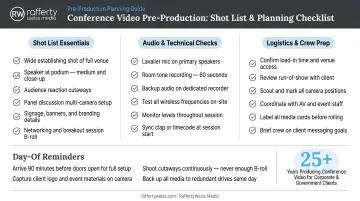
Confirm equipment minimums:
- A dedicated camera operator (not event staff doubling up)
- A lapel or directional mic for interviews
- A plan for both wide establishing shots and close-up reaction coverage
For high-stakes conferences, partnering with a professional production team at this stage is the more reliable path. RaffertyWeiss Media manages the full production cycle — from pre-event planning through on-site execution and final delivery — starting with a clear strategic brief before a camera is ever turned on. That upfront alignment is what separates a polished highlight reel from a disjointed clip package.
Production: What to Capture on the Day
On event day, the goal is to capture a complete visual story — not just the stage.
Non-negotiable footage types:
- Wide venue shots that convey scale and audience size
- Keynote moments — especially quotable lines or high-energy exchanges
- Breakout sessions and panel discussions
- Networking interactions and candid hallway conversations
- Audience reactions: applause, laughter, engagement
Conduct structured interviews. Aim for three to five attendees and at least one keynote speaker or organizational lead. Prepare questions in advance that prompt specific, quotable responses rather than vague endorsements like "it was great." The question "What's one thing you're taking back to your team?" produces more usable material than "What did you think of the conference?"
TechSmith's 2024 research found that 87% of viewers prefer a real person on screen over animated characters or AI-generated content. Interview footage isn't just supplementary — it's often the most credible and watchable material in the finished video.
Post-Production: Editing Into a Final Video
Once you have your footage, editorial structure determines whether a viewer watches to the end or drops off at the 30-second mark.
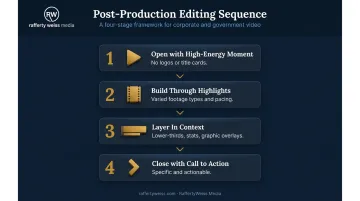
Follow this sequence:
- Open with a high-energy moment — not a logo, not a title card
- Build through event highlights using varied footage types and pacing
- Layer in speaker names, event statistics, and key context via lower-thirds and graphic overlays
- Close with a clear, specific call to action
On music: select tracks that match the event's tone and target audience. Upbeat cuts work for high-energy industry events; measured, professional tracks suit government or healthcare-sector conferences.
Music licensing is non-negotiable. ASCAP specifies that using music with visual images requires a synchronization license — and BMI clarifies that sync licenses are administered by song publishers directly, not by performance rights organizations. Stock music libraries with explicit sync clearance are the practical solution for most organizations.
Editing and Post-Production Essentials
Pacing as an Editorial Tool
Pacing is deliberate, not accidental. The most effective highlight videos alternate between high-energy sequences — crowd applause, keynote moments, fast cuts between reactions — and slower, more deliberate segments where interview soundbites or key statistics can actually register.
Cutting too fast throughout is a common trap. Viewers need time to absorb information, and constant rapid-fire cuts signal energy without delivering meaning.
A rough rhythm that works: two to three seconds of high-energy B-roll, cut to a three to five second interview clip, back to event footage. Repeat, varying the content type each time.
Motion Graphics and Lower-Thirds
Text overlays and graphics do more than add polish — they add comprehension. TechSmith's 2024 research found that professional-style effects including text, overlays, and graphics engage 51% of viewers, with 42% ranking professional graphics among their top three important content characteristics.
Standard graphic elements for conference videos:
- Speaker name lower-thirds (name and title, displayed for three to five seconds)
- Event statistics (attendee count, years running, number of sponsors)
- Key quote callouts for particularly strong soundbites
- Branded end cards with the call to action
RaffertyWeiss Media's motion graphics team builds custom branded packages for corporate and government clients, handling animated lower-thirds, stat sequences, and end cards within a single post-production workflow to keep revisions clean and consistent.
Audio Mixing and Cleanup
Poor audio quality is tied with blurry footage as the top reason viewers stop watching, according to TechSmith's research. Separately, 35% of viewers cited high-quality, easy-to-hear audio as one of the primary reasons they stay engaged.
To meet that standard, post-production audio cleanup should include:
- Ambient noise reduction on interview tracks
- Level consistency across all spoken segments
- Music mixed low enough that it never competes with speech
If audio was poorly captured on-site, post-production options are limited — noise reduction can only recover so much. Clean source audio and solid post-production work together; neither fully compensates for the other.
Common Mistakes That Undermine Conference Highlight Videos
Skipping Pre-Production Planning
Arriving at an event without a shot list, unscheduled interviews, or a defined video goal produces one outcome: disorganized footage that's difficult and expensive to edit into anything coherent.
Crew and talent are typically paid by the day. Exceeding schedule by even a short margin triggers overtime costs, and those costs compound further when re-shoots are needed because critical moments were missed in the first place. A pre-production plan prevents all of it.
Over-Relying on Stage Footage
A highlight video built almost entirely on wide-angle speaker shots is a recording, not a story. What future attendees are actually evaluating when they watch is the human element: networking conversations, visible reactions, the energy of a room full of engaged people.
B-roll and candid footage aren't optional extras. They're the material that makes the difference between "that looks interesting" and "I need to be at that event."
Forgetting the Call to Action
A well-produced video that ends without directing the viewer somewhere has completed most of the work — and wasted it. The CTA should be specific:
- "Register for [Event Name] 2026 — link below"
- "Download the full event report at [URL]"
- "Contact us to learn about sponsorship opportunities"
Place it in the final five seconds of the video itself and repeat it in any accompanying distribution copy — email, LinkedIn post, website embed. The video creates the interest; the CTA converts it.
How to Use Your Conference Highlight Video After the Event
Distribution Timing and Channels
Distribute within the first 24 hours. Eventbrite's guidance supports this window for follow-up while audience interest and social conversation are still active — the longer you wait, the more the moment fades.
Primary distribution channels:
- Email to attendees and stakeholders within 24–48 hours
- LinkedIn post from the organization's page and relevant personal profiles
- Organization website (event recap page and/or homepage feature)
- Sponsor-facing delivery as a campaign asset
- Sales conversations for speaker recruitment for future events
LinkedIn's 2024 B2B Marketing Benchmark reports that more than 50% of B2B marketers use video and visual content as a top content form — making it a natural fit for conference distribution.
Repurposing Into Multiple Assets
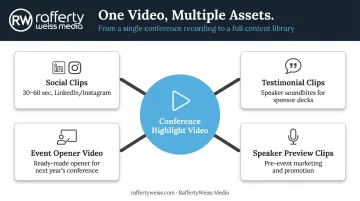
One conference highlight video can generate a full content library:
- Social clips (30–60 seconds) cut from the full video for LinkedIn or Instagram
- Testimonial clips pulled from interview segments for sponsor decks or speaker recruitment emails
- Event opener video for next year's conference kickoff — play it in the room before the first keynote
- Speaker preview clips to promote individual presenters in pre-event marketing
PCMA notes that longer event content can be condensed into shorter highlights, with speakers able to timestamp their best moments for social and marketing clips. That's the approach RaffertyWeiss Media takes with association clients: each event production includes live broadcasts, post-event highlight reels, and speaker preview clips — so the content keeps working well past the closing session.
Frequently Asked Questions
What is a conference highlight video?
A conference highlight video is a short edited piece — typically one to five minutes — that distills a multi-day event into its most impactful moments. It includes key speaker footage, attendee reactions, and event context, and serves as both a post-event recap and a promotional asset for future events.
What should you include in a conference highlight video?
The core elements are keynote speaker footage, attendee testimonials, B-roll of the event atmosphere, key statistics displayed via graphics, and a closing call to action. Speaker name lower-thirds and event branding round out the professional finish.
How long should a conference highlight video be?
One to three minutes works well for social media and promotional use. Three to five minutes is appropriate for sponsor reports or internal stakeholder audiences. Regardless of length, every second should earn its place — if a clip isn't pulling its weight, cut it.
When should you release a conference highlight video?
Release within 24–48 hours of the event's close while audience interest and social conversation are still active. A delayed release reduces engagement and diminishes its promotional impact.
How much does it cost to produce a conference highlight video?
Costs vary based on crew size, event duration, editing complexity, and production company involvement. Weigh the investment against long-term value — a well-produced highlight video can serve recruitment, sponsorship, and marketing goals for years after the event.
Do you need a professional videographer for a conference highlight video?
In-house production works for lower-stakes events. For corporate, government, or nonprofit conferences — where the video represents the organization to sponsors and stakeholders — professional crew and editing expertise make a measurable difference in how the event is perceived.