Introduction
Picture this: 600 employees are gathered for a corporate town hall. Executives are on stage. Hundreds more are watching the live stream from offices across the country. Then the audio cuts out. The camera stays locked on an empty podium. A slide deck no one approved plays to the main screen.
This is what happens when broadcast video production is treated as an afterthought.
For any live event where the audience (in the room or remote) needs to see and hear everything clearly, professional broadcast production isn't optional. According to Shure's research, roughly 90% of organizations say technology quality affects how staff and clients perceive them, and that figure applies to audio alone.
This guide covers everything you need to know before you talk to a vendor:
- What broadcast video production actually involves
- How the three production phases work
- What equipment and crew you need
- How to plan and budget effectively
Key Takeaways
- Broadcast video production captures, switches, and delivers live footage to in-room displays or remote audiences in real time
- Every professional broadcast follows three phases: pre-production planning, live execution, and post-event deliverables
- Cameras, switchers, audio consoles, and media servers each play a defined role — but the setup only works when they're integrated correctly
- Gear doesn't make or break a live event. The crew does.
- What you control most: early planning, a clear brief, and the production partner you hire
What Is Broadcast Video Production?
Broadcast video production is the end-to-end process of capturing live footage with professional cameras, routing and switching between multiple video sources in real time, and delivering that content to an audience — whether on screens in the venue, via live stream, or over broadcast television.
That real-time delivery requirement separates it from standard video production in a fundamental way. Every camera cut, audio cue, and graphics push happens once — in sequence, in front of your audience, with no opportunity to reshoot.
ENG vs. EFP: Which Model Applies to Your Event?
The International Telecommunication Union (ITU) distinguishes two dominant field production approaches, and understanding the difference matters when scoping your event:
- ENG (Electronic News Gathering) — Rapid, unplanned deployment for breaking news. Mobile, minimal crew, built for speed over polish.
- EFP (Electronic Field Production) — Planned coverage requiring higher production values. Multi-camera setups, coordinated crew, and structured signal routing. This is the correct model for corporate conferences, government proceedings, galas, and association events.
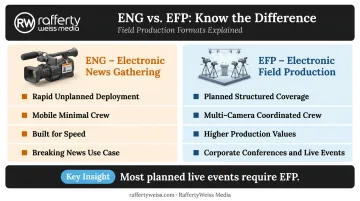
Most planned live events fall squarely into the EFP category. A vendor approaching your annual leadership conference with an ENG mindset — minimal crew, no signal routing plan, no pre-production coordination — will struggle to deliver the production quality your audience expects.
The Three Phases of Live Event Broadcast Video Production
Every professional broadcast follows the same structure: pre-production, production, and post-production. Rushing any phase creates visible problems on event day.
Pre-Production: Planning and Preparation
Pre-production is where avoidable failures are prevented. This phase includes:
- Run-of-show development — Scripting or mapping the event timeline, including speaker transitions, video playback cues, and graphics timing
- Venue scouting — Assessing power availability, signal routing paths, camera placement options, and lighting conditions
- Content asset confirmation — Verifying that slide decks, video bumpers, and speaker graphics are finalized and formatted correctly
- Crew briefing — Ensuring every person on production knows their role, cue sequence, and contingency responsibilities before the event starts
Rehearsals deserve special attention. AVIXA's hybrid event production guidance calls for complete simulations that test transitions between live speakers and pre-produced content, validate cue sequences, and confirm signal handoffs. A 30-minute camera rehearsal can surface audio routing issues and switcher configuration errors — the kind that are catastrophic if discovered mid-broadcast.
RaffertyWeiss Media conducts pre-event technical rehearsals, bandwidth tests, and equipment checks as standard practice for mission-critical events — not as optional add-ons.
Production: Executing the Live Broadcast
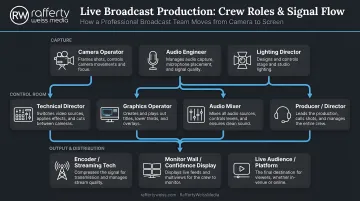
On event day, the production team operates from a control room or fly pack. This is a portable, self-contained system that integrates switching, routing, audio, graphics, intercom, and monitoring into a single deployable unit.
During the live broadcast:
- The Technical Director operates the switcher and manages signal flow between all video sources
- The Director calls camera shots over headset and coordinates the creative execution
- Live microphones, playback levels, and crew communication fall to the audio engineers
- Graphics operators push on-screen titles, lower thirds, and supporting visuals on cue
- Throughout the broadcast, the Producer manages the run-of-show and stays in direct communication with the client
Redundancy is standard practice on professional productions, not a premium add-on. This means backup signal paths, redundant record decks, spare cables, and contingency plans tested before the event starts. RaffertyWeiss Media configures redundant backup streaming paths for mission-critical events, so a single connection failure doesn't bring down the broadcast.
Post-Production: Deliverables After the Event
Most clients need more than a raw recording — yet post-event deliverables are often the last thing scoped. Once the live event ends, the list typically includes:
- A clean highlight reel for internal distribution or public communications
- Edited keynote or speaker segments for on-demand viewing
- Social media cuts formatted for each platform
- An archived master recording
Building these into the scope before the event — not as a request the morning after — ensures the production team captures what's needed during the live shoot.
Essential Equipment for Live Event Broadcast Video
Equipment requirements scale with event scope. A 200-person internal town hall has different needs than a 2,000-person national conference with simultaneous multi-platform streaming. That said, the core equipment categories remain consistent:
| Category | Function |
|---|---|
| Professional broadcast cameras | Capture presenters, audience, and B-roll from multiple angles |
| Video switcher | Cuts between camera feeds and video sources in real time |
| Media server | Manages and plays back pre-produced content to screens |
| Display technology | LED walls, projectors, and confidence monitors for in-room audiences |
| Audio console | Mixes live microphones, playback, and IFB feeds |
| Wireless microphones | Lavalier and handheld systems for speakers |
| Encoding and streaming tools | Distributes the program feed to remote viewers |
Audio: The Most Underestimated Component
Audio is where live events most often fall short, and the effects are immediate. Shure's research found that 50% of organizations report poor audio reduces decision-making ability, and that audiences consistently rate speakers as less trustworthy and less credible when sound quality is poor.
Professional audio infrastructure for a live event includes:
- Wireless lavalier microphones (systems like Shure Axient Digital are built for high-density RF environments with spectrum monitoring)
- A dedicated broadcast audio console for mixing and monitoring
- IFB (Interruptible Foldback) systems that allow producers to communicate with talent without interfering with the program feed
Budget for audio as a standalone line item — not as an afterthought folded into general A/V costs. Under-resourcing this area is one of the most common mistakes in live event planning.
Key Roles in a Broadcast Video Production Crew
A live broadcast requires a coordinated team of specialists. The Bureau of Labor Statistics classifies broadcast, sound, and video technicians as distinct occupational roles for good reason — the skills don't overlap cleanly, and gaps in coverage show up on screen.
Core crew roles for a live event broadcast:
- Director — Calls camera shots and coordinates creative execution throughout the event
- Technical Director (TD) — Operates the video switcher and manages all signal flow
- Camera Operators — Two to five, depending on event scale and shot complexity
- Audio Engineer — Manages microphones, playback, mixing, and crew communication
- Graphics Operator — Pushes titles, lower thirds, and supporting visuals on cue
- Producer — Manages the run-of-show, coordinates with the client, and handles real-time decisions
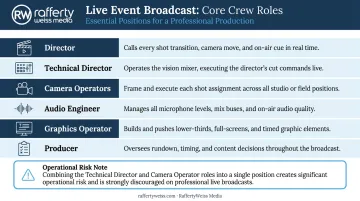
On smaller productions, some roles can be combined without significant risk — the Director and TD can sometimes be the same person on a straightforward single-stage event. But combining the TD and a camera operator creates real risk: you cannot cut between feeds and operate a camera simultaneously without sacrificing both.
Experienced crews bring something no equipment list covers. They know what goes wrong — a dropped feed, a hot mic, a graphics cue missed — and they fix it before the audience notices. That's the practical difference between a production that looks professional and one that simply happened to be live.
Types of Live Events That Benefit from Broadcast Video Production
Professional broadcast production is appropriate whenever audience size, brand visibility, or messaging accuracy make a technical failure genuinely costly — and that threshold applies to more event types than most organizations expect.
Events that most commonly require professional broadcast video:
- Corporate conferences and town halls — Executive visibility and message consistency across in-room and remote audiences, where a dropped feed or audio failure undermines credibility
- Galas and awards ceremonies — Timing-sensitive programming with multiple presenters and video elements
- Product launches and brand activations — High production value tied directly to brand perception
- Government and public-sector proceedings — Where accessibility compliance, official record requirements, and public accountability demand technically clean output
- Non-profit fundraising events — Emotional storytelling delivered cleanly to donors and stakeholders
- Association general sessions and annual meetings — Large member audiences with complex run-of-show requirements
RaffertyWeiss Media has produced events across all of these categories — from Giant Food's annual business meeting for 700 associates to events for the American College of Cardiology, AARP, the American Psychological Association, and federal agencies including the CDC and Department of Justice. For these clients, a broadcast failure isn't just an inconvenience — it can disrupt proceedings, misrepresent leadership, or require costly re-shoots that a live event simply doesn't allow.
How to Plan and Budget for Live Event Broadcast Video Production
Key Variables That Drive Scope and Cost
Before approaching any production vendor, understand what drives the number on the quote:
- Number of cameras — More angles mean more operators, more signal routing, and more switcher inputs
- Event duration — A half-day shoot is a different engagement than a two-day conference
- Venue complexity — Larger venues require more cabling, more audio coverage, and often more crew
- Display technology — LED walls, multi-screen configurations, and projection mapping add significantly to scope
- Streaming requirements — Multi-platform simultaneous streaming and redundant backup paths increase technical complexity
- Post-event deliverables — Highlight reels, speaker edits, and social cuts require dedicated post-production time
Questions to Bring to Your First Production Conversation
Don't enter a vendor conversation without answers to these:
- What is the primary audience — in-room, remote, or both?
- What content will play to screens, and who is responsible for creating it?
- What is the backup plan if a primary feed or streaming connection fails?
- What deliverables are needed, and within what timeframe after the event?
- Has a technical rehearsal been built into the event day schedule?
Booking Timeline
Book your production partner as early as possible — for large events, months in advance. Early booking ensures availability, allows time for venue walkthroughs, and gives the production team enough lead time for pre-production. Last-minute bookings consistently produce rushed pre-production, skipped rehearsals, and preventable problems on event day.
A general timeline to work from:
- 6+ months out: Finalize your production partner and begin venue walkthroughs
- 3–4 months out: Lock in crew, equipment, and streaming infrastructure needs
- 4–6 weeks out: Complete technical riders, run-of-show, and content delivery schedules
- 1–2 weeks out: Conduct technical rehearsal and confirm all backup systems
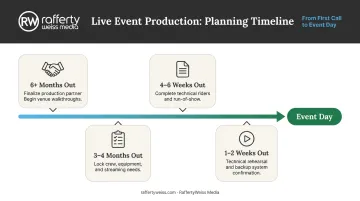
RaffertyWeiss Media follows this exact process with every client — from the first planning conversation through post-event delivery — which is why organizations like Lockheed Martin, Georgetown University, and the American Red Cross bring us in early.
Frequently Asked Questions
What is broadcast video production?
Broadcast video production is the process of capturing live footage with multiple cameras, switching between feeds in real time, and delivering that content to an audience — in the venue via displays, or to remote viewers via stream or television. Unlike standard production, it happens once, live, with no opportunity to reshoot.
What types of live events benefit from broadcast video production?
Most professional events benefit — corporate conferences, town halls, galas, product launches, government proceedings, and non-profit fundraisers among them. It's especially valuable where audience size, brand visibility, or messaging accuracy make professional execution non-negotiable.
What equipment is needed for a live event broadcast?
The core setup includes professional broadcast cameras, a video switcher, a media server for content playback, audio consoles and wireless microphone systems, and display technology such as LED walls or projectors. Events with remote audiences also require encoding and streaming infrastructure.
How far in advance should I book a broadcast video production team?
For large-scale events, aim for three to six months out. Earlier is better — it secures crew availability, allows time for venue scouting, and builds in adequate runway for rehearsals and technical run-throughs.
What is the difference between live streaming and broadcast video production?
Live streaming is a delivery method — it distributes video over the internet to remote viewers. Broadcast video production is the full production process that makes that stream look and sound professional. A production team handles cameras, audio, switching, and graphics. The live stream is one possible output of that process.
How much does live event broadcast video production cost?
Cost varies based on camera count, crew size, event duration, venue complexity, and streaming requirements. Share a detailed brief — event type, audience size, content needs, and deliverable expectations — and request an itemized estimate from your production vendor.