That's the specific risk political live streaming carries. A dropped stream during a key policy announcement, distorted audio on a candidate's speech, or a stream that never reaches your target audience — these aren't just technical problems. They're communications failures with real consequences.
The teams handling political event streams range from campaign communications staff to government public affairs offices to nonprofit advocacy groups. What they share is a tendency to underestimate the technical complexity until something goes wrong. This guide covers everything needed to plan, equip, and execute a professional-quality live stream for political events of any size — before that happens to you.
Key Takeaways
- Broadcast-quality audio, stable internet (wired or bonded cellular), and a tested encoder are non-negotiable minimums
- Stream to multiple platforms simultaneously — YouTube, Facebook, and X each reach different political audiences
- Pew Research (2025) finds 53% of U.S. adults get news from social media — making platform reach a strategic priority
- A full technical rehearsal at least 90 minutes before doors open is essential — political events rarely allow second chances
- Major announcements, debates, and multi-camera productions warrant a professional video production team
Pre-Event Planning: What You Need Before Going Live
Most live streaming failures at political events are decided before anyone presses "go live." The planning gap — usually the two weeks before the event — is where key details get missed.
Confirm these elements well in advance:
- Event format — outdoor rally, indoor town hall, hybrid hearing, or press conference each has different audio, connectivity, and camera requirements
- Speaker count — a panel of five needs different camera coverage than a single podium address
- Interactivity — streaming Q&A or crowd interaction changes your mic setup significantly
- Compliance requirements — FEC rules require internet video disclaimers for candidate committees to be visible for at least 4 seconds and appear without viewer action; build this into your graphics templates before event day
Venue and Connectivity Assessment
Don't skip a physical walkthrough. Many political venues — convention halls, outdoor plazas, government buildings — have unpredictable network conditions that aren't apparent until you're on-site with equipment.
What to confirm at the venue:
- Dedicated upload bandwidth — shared venue Wi-Fi fails under event-day load; get your own circuit
- Ethernet drop locations and power access at each planned camera and encoder position
- Clean audio feed from the house mixing board via XLR — essential for large venues where ambient noise is uncontrolled
- Existing camera outputs — confirm whether HD HDMI feeds from venue rigs can be tapped directly into your encoder
Platform and Distribution Strategy
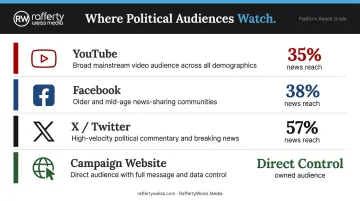
Stream to multiple platforms simultaneously — political audiences are fragmented across channels, and a single-platform approach will miss significant voter segments:
- YouTube Live — 35% of U.S. adults regularly get news here; strong for archiving and searchability
- Facebook Live — 38% of U.S. adults regularly get news here; reaches older voter demographics effectively
- X (Twitter) — 57% of X users regularly get news on the platform; essential for journalists and politically engaged audiences
- Campaign or agency website — gives you direct audience control without platform algorithm dependency
Multi-streaming software handles this without juggling separate stream keys — vMix supports up to 5 simultaneous destinations, and Wirecast manages multiple live sources from a single encoder output.
Note for government agencies: Federal livestream recordings may constitute federal records under NARA guidance. State and local open-meetings obligations vary. Confirm archiving and retention requirements with legal counsel before the event.
Essential Equipment Checklist for Political Event Live Streaming
Equipment needs scale with event complexity. A two-person press briefing and a 5,000-person rally have almost nothing in common technically. Cutting corners on audio or connectivity is where most political streams fail — not camera quality.
Cameras
| Event Type | Recommended Setup |
|---|---|
| Press briefing / small town hall | Single prosumer camcorder or mirrorless (Sony/Canon) |
| Multi-speaker panel | Two cameras: one wide, one medium on speakers |
| Large rally | Three cameras with dedicated operators + locked-off wide shot |
DSLRs and mirrorless cameras require "clean HDMI out" enabled and a capture card to connect to your encoder. Multi-camera setups need either a dedicated video switcher (Blackmagic ATEM Mini handles 4 or 8 HDMI inputs depending on model) or encoding software capable of managing multiple inputs.
Audio
Audio is the most common viewer complaint from political live streams. Get this right before worrying about anything else.
- Podium or lectern mics work well for fixed-position speakers in controlled settings
- Wireless lavaliers for candidates and speakers who move on stage
- Handheld wireless mics handle Q&A and crowd interaction
- Run an XLR line to the house mixing board at large venues — this is your cleanest feed
- Keep a shotgun mic as an ambient backup regardless of setup
For outdoor rallies: use deadcat wind covers on all exposed microphones. Wireless dropouts from antenna placement or RF interference are a common failure point — coordinate frequencies in advance if running multiple wireless systems in the same space.
Encoding and Streaming Software
Your encoder choice comes down to budget and reliability requirements. Two main paths:
- Software encoders (OBS Studio, vMix, Wirecast): run on a dedicated laptop; OBS is free and widely used, vMix and Wirecast offer more robust multi-camera control
- Hardware encoders (Blackmagic ATEM Mini, Teradek, LiveU): purpose-built for stability on extended or mission-critical streams
For campaign trail or mobile events, cellular bonding devices (LiveU Solo PRO Connect supports up to 6 simultaneous IP connections — 4 cellular, 1 ethernet, 1 WiFi) provide stable upload even where fixed internet isn't available.
Internet Connection and Supporting Gear
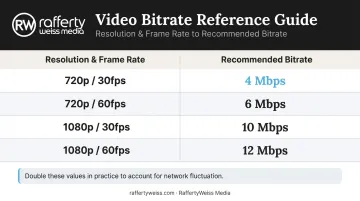
Your upload speed sets the ceiling on stream quality. Use YouTube's recommended H.264 bitrates as your floor — then double them in practice to account for network fluctuation:
| Resolution | Recommended Bitrate |
|---|---|
| 720p at 30fps | 4 Mbps |
| 720p at 60fps | 6 Mbps |
| 1080p at 30fps | 10 Mbps |
| 1080p at 60fps | 12 Mbps |
For fixed venues, wired ethernet is the standard. For outdoor or mobile events, bonded cellular is both the backup and often the primary connection.
Supporting gear checklist:
- Heavy-duty fluid-head tripods for every camera
- Dedicated streaming laptop — never share it with other event functions
- HDMI and XLR cables, with spares for both
- Capture card if using DSLR or mirrorless cameras
- Portable UPS or surge protector
- Mobile hotspot as secondary internet backup
- Labeled cables to prevent chaos during fast setup and teardown
How to Set Up Your Live Stream for a Political Event
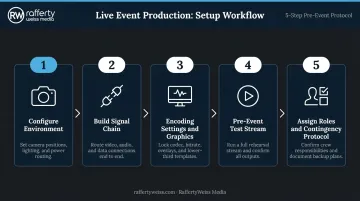
Live streaming setup follows a defined sequence. Compressing this timeline causes most day-of failures.
Step 1: Configure the Streaming Environment
Start 3–4 hours before event start for a standard setup (more for multi-camera or multi-location). In this window:
- Position cameras based on a pre-scouted floor plan
- Run all cables before the venue fills with staff and attendees
- Secure the streaming laptop in a protected operator position with power confirmed
- Test power access at every equipment position
Step 2: Build the Signal Chain
Follow the path: Camera(s) → capture card → encoder input → encoding software → streaming platforms
Configure each video and audio source inside your encoding software. Assign the house audio feed from the mixing board as the primary audio input. Test every connection individually before testing the full chain together: this isolates problems before they compound.
Step 3: Configure Encoding Settings and Stream Destinations
- Input stream keys for each destination platform
- Set bitrate and resolution appropriate for your venue's confirmed upload speed
- Add lower-third graphics: candidate name, event title, campaign logo
- Confirm FEC-compliant disclaimer placement if streaming paid or campaign content
Build and test these graphic overlays in advance. Build them on event day and you will miss something.
Step 4: Run a Full Pre-Event Test Stream
Go live to a private or unlisted stream at least 90 minutes before doors open. Check:
- Audio/video sync (use the clap test)
- Stream health stats in your encoding software (dropped frames, bitrate stability)
- Stream appearance on all destination platforms
- Have a second team member watch the output on a mobile device to catch viewer-side buffering or audio drift
Step 5: Assign Roles and Establish a Monitoring Protocol
Minimum staffing:
- One camera operator per camera
- One encoder/stream operator
- One stream monitor watching viewer output throughout the event
Use headsets or radios so the encoder operator can receive alerts instantly. Before going live, write out your contingency protocol for each failure scenario:
- Internet drops mid-stream
- A camera feed fails
- Audio cuts out
A written checklist produces faster, calmer responses when something actually goes wrong.
Common Live Streaming Problems at Political Events
Dropped Stream or Buffering
Problem: Stream drops or stutters mid-event, most visibly during a key speech.
Likely cause: OBS documentation confirms that dropped frames indicate the connection to the remote server is unstable or can't sustain the set bitrate — most often from shared venue Wi-Fi or congested cellular at a large outdoor event.
Fix:
- Switch to the backup internet connection
- Reduce streaming bitrate in the encoder
- Post a brief social media update acknowledging the interruption
Audio Loss or Poor Sound Quality
Problem: Viewers report no audio, low audio, or distorted sound.
Likely cause: Wrong audio source selected in encoding software, a loose cable at the house board connection, or a wireless mic with dead batteries or lost signal.
Fix:
- Check the audio input monitor in your encoding software immediately
- Switch to the backup mic source if available
- Send a crew member to check all audio connections at the encoder and mixing board
Video/Audio Sync Drift
Problem: Speaker audio doesn't match mouth movement — and gets worse over a long broadcast.
Likely cause: Processing delay differences between the video capture card and audio interface, particularly under heavy CPU load.
Fix: Adjust the audio delay offset in small increments while monitoring the output in your encoding software. If the problem persists, switch the audio interface to a lower-latency input mode or reduce encoding complexity to free up CPU resources.
Pro Tips for High-Stakes Political Event Streams
Scout the venue in advance. Do a technical walkthrough with the venue's A/V manager at least one week before the event. Confirm house audio feed availability, network infrastructure, and power access at every equipment position. Last-minute surprises are expensive at political events where the schedule doesn't flex.
Build branded graphics into your encoding template before event day. Lower-thirds with the candidate name, event hashtag, and campaign website URL give the stream a broadcast-quality appearance and reinforce your messaging throughout. Viewers are more likely to trust — and share — a stream that looks professional.
Archive immediately after the event. Download the recorded file from the platform, save it to local storage, and post it for on-demand viewing on the campaign website and social channels within hours. For government agencies, streamed public meetings may have specific archiving and public records obligations under federal records guidance — confirm requirements with legal counsel beforehand.
Know when to bring in professionals. For events with national visibility or tight timelines — major policy announcements, multi-camera debates, government press conferences — experienced production support is worth the investment.
RaffertyWeiss Media has spent over 25 years producing live video content for federal agencies and major organizations in Washington, D.C. Their teams handle redundant backup streaming paths, pre-event technical rehearsals, and full technical direction — the production infrastructure that keeps high-visibility streams on air without incident.
Frequently Asked Questions
What equipment do I need to live stream a political rally?
At minimum: a prosumer camera with HDMI output, a wireless microphone or direct connection to the event's PA system, a laptop running OBS or similar encoding software, and a stable internet connection. For outdoor rallies, a bonded cellular device is strongly recommended over relying on venue or mobile Wi-Fi.
Which platforms should I stream a political event to?
YouTube Live, Facebook Live, and X (Twitter) cover the broadest political audience. Stream to all three simultaneously using multi-streaming software — this adds no extra bandwidth on your end and significantly extends your reach with no added effort during the event.
How much upload bandwidth do I need?
Use YouTube's recommended bitrates as your baseline (10 Mbps for 1080p at 30fps), then double it to account for network fluctuation. Plan for at least 20 Mbps of stable, dedicated upload capacity. Wired ethernet is preferred; bonded cellular is the recommended backup for high-stakes events.
Should my campaign team handle live streaming or hire a professional?
In-house teams can manage smaller, lower-stakes events with proper preparation. For major announcements, multi-camera productions, or anything with broadcast or media distribution requirements, professional production support sharply cuts the risk of a visible, politically costly failure.
How do I get good audio for an outdoor political rally?
Use wireless lavalier or handheld mics for the speaker, add deadcat wind covers to all exposed microphones, and connect directly to the event's house PA system wherever possible. Camera-mounted mics are a last resort outdoors. Wind and distance from the speaker will undermine audio quality.
What should I do if my live stream crashes during a political event?
Switch to your backup internet connection immediately and restart the stream. Post a brief update on social channels acknowledging the interruption, since transparency reduces viewer frustration. Ensure the full event is recorded locally so the complete video can be posted on-demand if the live stream fails entirely.