Introduction
Most organizations understand they need a virtual or hybrid event. Far fewer understand what it actually takes to produce one well.
Virtual and hybrid event production is the full technical, creative, and logistical process of delivering an event to both live and remote audiences at professional broadcast quality. The gap between "we streamed it" and "we produced it" is enormous — and audiences notice every time.
Corporate communications teams, government agencies, nonprofits, and associations often reduce this to a platform decision. Pick Zoom or Teams, send a link, and call it a day.
According to Kaltura's research of 1,544 organizers and attendees, 71% of attendees said they would abandon a virtual event because of technical issues. Another 88% rated a seamless technical experience as important or critical.
Platform selection is one component. Production is everything else: camera direction, audio engineering, streaming infrastructure, encoding, speaker preparation, and post-production content. This guide covers all of it.
Key Takeaways
- Virtual events are fully online; hybrid events serve both an in-room and remote audience simultaneously — each requires a distinct production approach
- 71% of virtual attendees will leave due to technical problems, making production quality the primary driver of audience retention
- Hybrid events run as two productions simultaneously — which is why they cost more than either format on its own
- A production team typically includes a producer, technical director, AV engineers, encoding technician, and stage manager
- Budget realistically: simple virtual events start around $3,500; hybrid productions scale well beyond that depending on size and venue
What Are Virtual and Hybrid Events?
A virtual event is an entirely online gathering where every attendee participates remotely. There's no physical venue — sessions, networking, and interaction all happen through a digital platform.
A hybrid event goes further. Some attendees are physically present at a venue; others join live from anywhere. Both audiences participate in the same program simultaneously, which is what makes hybrid production complex to execute well.
How These Differ from a Simple Webinar
Professional events differ from webinars across every dimension of production:
- Attendance can span hundreds or thousands of participants across multiple time zones
- Polls, moderated Q&A, breakout rooms, and networking features all require active management during the event
- Multi-camera switching, broadcast encoders, and streaming redundancy go well beyond a screen-share call
- A single person can run a webinar; a professional hybrid event typically requires six or more crew members working simultaneously
MPI defines a hybrid event as a gathering with at least one group of face-to-face participants digitally connected with participants in other locations. In practice, that means managing two distinct audience experiences at the same time — each with its own technical requirements, engagement needs, and failure points.
Why Organizations Are Prioritizing Virtual and Hybrid Event Production
The virtual events market hit $98.07 billion in 2024 and is projected to reach $297.16 billion by 2030 — a 20% annual growth rate. This isn't residual pandemic behavior. Organizations have discovered that virtual and hybrid formats offer durable strategic advantages.
The Case for Going Beyond In-Person
The reach gains can be dramatic. When the Genetics Society of America moved its conference to a virtual format, registration grew from 2,650 expected in-person attendees to over 14,000 participants, and country representation expanded from 46 to 79 nations.
Professional meeting planners have internalized this shift: a recent PCMA survey reports respondents planned an average of 18 digital and hybrid events in 2025 — a standard part of their annual calendar, not occasional experiments.
The core drivers for most organizations:
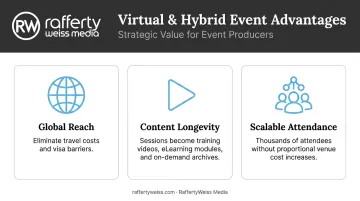
- Reach global audiences without travel costs or visa barriers
- Recorded sessions become training videos, eLearning modules, and on-demand archives long after the event ends
- Attendance can scale to thousands without a proportional increase in venue costs
What Government and Corporate Clients Need That Basic Video Calls Can't Provide
Those general benefits apply broadly — but federal agencies and large corporations carry additional requirements that consumer-grade tools simply can't meet:
- Section 508 compliance — closed captioning, audio description, and accessible formatting are legal requirements for government events, not optional add-ons
- Controlled visuals and approved graphics that hold to brand standards throughout the broadcast
- Password-protected or members-only streaming for restricted audiences
- Session-level attendance data and participation metrics for post-event reporting
RaffertyWeiss Media builds Section 508 compliance into government production workflows from the start, not as an afterthought. That distinction matters when communications are going to federal employees or the public.
What Goes Wrong Without Professional Production
The failure modes are predictable:
- Virtual attendees drop off when audio breaks up or video buffers
- Remote participants feel like observers rather than participants when no one manages their experience
- Brand and messaging standards erode when no one owns the visual output
- Live technical failures — a frozen stream, dropped audio, a missed speaker transition — have no pause button; recovery depends entirely on having a crew that anticipated them
How Virtual and Hybrid Event Production Works
Virtual and hybrid events aren't single-day executions. They're three-phase workflows — pre-production, live production, and post-production — that must be planned as one connected process.
For hybrid events specifically, the production team runs two simultaneous productions: one for the in-room audience (AV, staging, presentation flow) and one for the virtual audience (camera direction, stream encoding, platform management, remote attendee support). That parallel structure is why PCMA describes hybrid as two distinct events, not one.
The three phases are:
- Pre-production — planning, platform configuration, tech checks, and rehearsals
- Live production — execution across in-room and virtual channels simultaneously
- Post-production — editing, repurposing, and distributing recorded content
Pre-Production Planning
Pre-production is where most events succeed or fail. What happens before the first speaker takes the stage determines everything that follows.
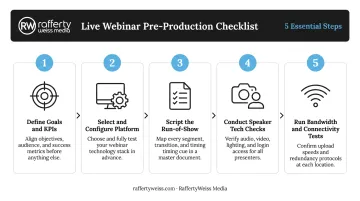
Standard pre-production steps include:
- Define event goals and KPIs — what does success look like for both audiences?
- Select and configure the streaming platform — based on audience size, engagement tools, security needs, and branding
- Script the run-of-show — every transition, graphic, poll, and cue mapped out in sequence
- Conduct speaker tech checks — test equipment, internet connections, lighting, and backgrounds for each presenter
- Run bandwidth and connectivity tests — verify upload speeds and configure backup paths before the event date
One principle guides all of this: content must be designed for both audiences from the start. Polls, Q&A tools, and session pacing that work for an in-room audience often need adjustment to serve virtual viewers equally. Retrofitting this on event day doesn't work.
RaffertyWeiss Media includes technical rehearsals, bandwidth tests, and equipment checks as standard pre-production steps — a practice built from 25+ years producing events for federal agencies, associations, and major corporations.
Live Production Execution
On event day, several roles operate simultaneously:
- Technical director — oversees camera switching, monitors stream quality, calls cues
- Audio engineers — manage in-room sound and broadcast audio as separate feeds
- Webcast producer — manages the virtual platform: slides, graphics, attendee support, interactive features
- Stage manager — coordinates speakers, manages timing, calls transitions
Reliable internet connectivity is the single most critical infrastructure requirement for hybrid production. AVIXA recommends backup encoders, alternative internet connections, and failover systems for any professional live broadcast. Venue WiFi is not a production path — a dedicated wired connection with verified upload headroom is the baseline.
For 1080p streaming at 30fps, Vimeo recommends 10.1–25 Mbps upload with a 4,000 kbps target bitrate. Wowza's engineering guidance advises setting your video bitrate 35–40% lower than your measured upload speed to maintain headroom under load. A bonded LTE or secondary ISP connection as backup is standard practice for mission-critical events.
Post-Production and Content Repurposing
Recorded content from a well-produced event has real reuse value. Organizations that invest in professional production often repurpose that footage across multiple channels:
- Edited session recordings for on-demand access
- Highlight reels for internal or external communications
- Speaker clips for social and email distribution
- Training modules or eLearning content repurposed from session footage
Because RaffertyWeiss Media handles both live event production and corporate video post-production, footage captured during the event arrives in post already formatted, labeled, and ready to edit. That means cleaner assets and faster turnaround on every deliverable that follows.
The Production Team Behind a Successful Event
Core Roles
| Role | Responsibility |
|---|---|
| Producer / Project Manager | Single point of contact, run-of-show, logistics |
| Technical Director | Oversight of all on-site and virtual technical elements |
| AV Engineers | Audio, video, and lighting for the in-room environment |
| Webcast / Encoding Technician | Stream monitoring, encoder management, platform |
| Attendee Support Staff | Real-time troubleshooting for virtual participants |
| Stage Manager | Speaker coordination, cues, rehearsals |
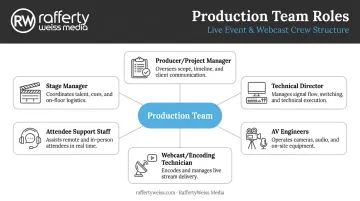
Not every event needs every role. A simple virtual-only event may require just a producer and encoding technician. A large hybrid conference with simultaneous in-room and virtual audiences may need eight or more crew members, depending on session count, platform complexity, and audience size.
Why a Full-Service Partner Changes the Outcome
Working with a production company rather than assembling in-house capability comes down to a few practical differences:
- Specialized equipment already configured and tested for broadcast-quality output
- Pre-built workflows that account for known failure modes in live production
- Contingency plans: redundant equipment, backup streams, failover paths
- Live problem-solving under pressure, without disrupting the audience experience
RaffertyWeiss Media operates as a single production partner for hybrid events, handling in-room AV, staging, multi-camera direction, live graphics, and virtual streaming in a unified workflow.
Two recent productions illustrate what that looks like in practice. The GirlUp Global Summit — a two-day fully virtual event — reached 50,000 live viewers. The WANADA Global Auto Policy Summit connected Washington policy discussions with automotive executives in Germany and Japan, coordinating across three time zones without a hitch.
Key Factors That Determine Production Quality
Camera, Audio, and Lighting
Multi-camera setups give the technical director the ability to cut to close-ups, reaction shots, and presentation slides — creating a television-like viewing experience for remote audiences. A single static camera at the back of a room does the opposite.
Broadcast-grade microphones and proper lighting for on-camera presenters directly affect how credible and professional the event appears. AVIXA identifies 1080p cameras with broadcast-quality lenses as the professional baseline for HD streaming.
Streaming Infrastructure
Key technical benchmarks for professional hybrid streaming:
- 1080p/30fps target bitrate: 3,000–6,000 kbps (Wowza)
- Recommended upload: 10.1–25 Mbps for 1080p/30fps (Vimeo)
- Network type: Dedicated wired Ethernet, not shared venue WiFi
- Redundancy: Backup encoder, secondary ISP or bonded LTE failover
Venue internet frequently cannot support broadcast-quality output at these specs without pre-event testing and reinforcement. Firewall configuration (RTMPS on port 443, RTMP on port 1935) is often required at event venues and must be arranged in advance.
Platform Selection
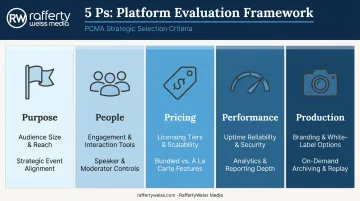
PCMA recommends evaluating platforms using a "5 Ps" framework: Purpose, People, Pricing, Performance, and Production. The right platform depends on:
- Audience size and geographic distribution
- Required engagement tools (polls, Q&A, breakout rooms, networking)
- Branding and white-label requirements
- Security needs (password protection, private access)
- On-demand archive requirements
RaffertyWeiss Media works across YouTube Live, Zoom Webinar, Microsoft Teams Live Events, Vimeo, and custom RTMP streams — selecting and configuring the right solution based on each client's event goals, audience size, and technical requirements.
Rehearsals and Speaker Preparation
Speaker tech checks and full production rehearsals are where most live production failures are prevented. Underprepared speakers and untested slide transitions are among the most common culprits. Every presenter should enter event day having already run through the full sequence with the production team.
Budget Realism
PCMA states clearly that a virtual event budget cannot be translated directly into a hybrid event budget. Hybrid adds incremental costs across platform, AV equipment, production crew, connectivity, and digital audience management — on top of the base in-person event costs.
General reference points from RaffertyWeiss Media:
- Simple virtual event (single presenter, half-day): starting around $3,500
- Single-camera webcast (half-day): starting around $2,500
- Full hybrid production with multi-camera setup, backup streaming, and post-event delivery: priced based on scope
Multi-day hybrid conferences with custom graphics, interactive tools, and post-production editing scale significantly from these baselines. The right approach is to scope the event before finalizing a budget — not the reverse.
Common Pitfalls and Misconceptions
Treating the virtual stream as an afterthought. The most common hybrid mistake is positioning one camera at the back of a room and piping the audio to a streaming link. Remote attendees get a worse version of the in-room experience rather than an equivalent one. Production must be designed for both audiences simultaneously from the planning stage.
Conflating platform with production. Choosing Zoom or Teams is not the same as planning production. The platform handles delivery; everything that determines quality — cameras, audio, lighting, encoding, graphics, moderation — exists entirely outside the platform. Organizations that buy a platform and assume the rest is handled are setting themselves up for a disappointing result.
Underestimating hybrid complexity. Many organizations budget for hybrid as if it's an in-person event with a streaming link added. It isn't. Hybrid is two parallel productions: separate audio feeds, separate camera direction, a dedicated virtual-audience support function, and more rehearsal time.
When that reality surfaces after budgeting, teams often cut the virtual production components to compensate — and remote attendees feel every one of those cuts.
Frequently Asked Questions
What are virtual and hybrid events?
Virtual events are fully online gatherings where all attendees participate remotely through a digital platform. Hybrid events combine a physical in-room audience with remote participants who join live — both audiences experience the same program simultaneously, requiring separate audio mixes, camera feeds, and streaming infrastructure for each audience.
What is a virtual event producer?
A virtual event producer manages the technical and logistical execution of an online event: overseeing the streaming platform, coordinating speakers, managing the run-of-show, and ensuring remote attendees have a seamless, professional experience from login to close.
What is an example of a hybrid event?
A corporate annual conference where executives present on a physical stage to an in-room audience while thousands of remote employees participate live through a streaming platform — submitting questions, responding to polls, and engaging in real time — is a standard hybrid event format.
What equipment is needed for hybrid event production?
Core hardware includes professional cameras at multiple angles, broadcast-grade microphones, lighting for on-camera presenters, a streaming encoder, a hardware or software video switcher, and a dedicated high-bandwidth internet connection with a secondary backup path.
How much does virtual or hybrid event production cost?
A simple virtual event can start around $3,500; a full hybrid production with professional AV crew, multi-camera setup, custom platform configuration, and post-production editing scales into the tens of thousands depending on scope.