Introduction
Webcasting, live streaming, webinars, podcasting: the terms get thrown around interchangeably, but they're not the same thing. Many event planners struggle to pick the right format, and the wrong choice can wreck engagement or hand over control of a message that really needed to stay on script.
The stakes are higher than they look. A shareholder call that glitches, or a government briefing streamed on the wrong platform without access controls, can damage credibility fast — especially in regulated industries where disclosure rules and public trust are on the line.
This guide breaks down what webcasting and live streaming actually mean, compares them side by side, covers realistic cost ranges, and clears up how podcasts and webinars fit into the picture. By the end, you'll know which format fits your next corporate, government, or nonprofit event.
Key Takeaways
- Webcasting delivers controlled, professional broadcasts to registered or private audiences, ideal for AGMs and compliance-sensitive events.
- Live streaming favors reach and immediacy over polish, often on open public platforms.
- Production quality, access control, and cost scale together: expect $2,500+ for a single-camera professional webcast.
- Webinars, podcasts, and video conferencing solve different problems than one-to-many broadcasts.
- Hybrid models pair a secure webcast with public highlights to deliver both control and visibility.
What is Webcasting?
A webcast is an internet-based broadcast of a live or prerecorded event, delivered to a structured, often registered audience. Think of it as a professional TV broadcast that happens to travel over the internet instead of the airwaves. Organizations use webcasts for annual general meetings (AGMs), product launches, press briefings, and congressional-style hearings where message accuracy matters.
Most webcasts run through a browser on any device, with no special software download required. Viewers click a link, sometimes enter a password or registration credential, and the event starts.
That accessibility matters for compliance, too. Under SEC guidance, companies making earnings announcements or investor disclosures must provide adequate advance notice, including the date, time, and dial-in or webcast access details. For regulated announcements, the how of distribution carries real legal weight.
Key Features of Webcasting
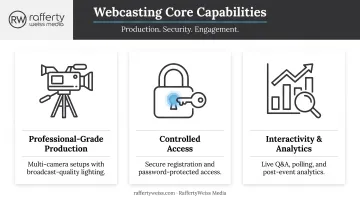
- Professional-grade production: multi-camera setups, scripted content, and broadcast-quality lighting and audio built for a polished, network-style presentation
- Controlled access: registration pages, password protection, or invite-only credentials that keep confidential or compliance-sensitive content restricted to the intended audience
- Built-in interactivity and analytics: moderated Q&A, live polling, and post-event metrics on who watched, for how long, and what they engaged with
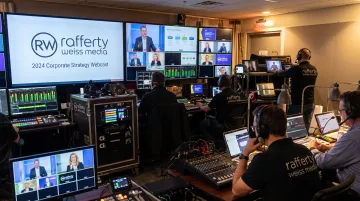
RaffertyWeiss Media typically runs these productions from a control-room environment: multiple camera feeds, live-graphics control, and audio-level monitoring, all managed in real time. That live control-room layer is what audiences experience as a produced webcast, not just a camera pointed at a stage.
What is Live Streaming?
Live streaming is the real-time transmission of video and audio over the internet. It's the broader, more casual cousin of webcasting, most often associated with open or semi-public broadcasts on platforms like YouTube, Facebook, or LinkedIn.
Where webcasting prioritizes control and polish, live streaming prioritizes immediacy and authenticity. A stream can be as simple as a smartphone held up at a press conference or as elaborate as a fully produced multi-camera broadcast. The format flexes to the moment.
Key Features of Live Streaming
- Low barrier to entry: viewers join instantly, often without registration, login, or any friction between clicking a link and watching.
- Real-time interaction: comments, reactions, and shares generate immediate, visible audience feedback during the broadcast itself.
- Broader organic reach: public platforms surface live content to followers and non-followers alike, extending visibility well beyond a targeted invite list.
AVIXA notes that a basic setup can cost a few hundred dollars or the price of a smartphone. A professional rig with a reliable camera, microphone, and mixing setup can run into the thousands—so teams can match production scale to the event.
Webcasting vs. Live Streaming: The Key Differences
The two formats overlap more than people expect: a webcast often uses live-streaming technology to deliver its content. The real distinction is less about the delivery tech and more about who is watching and why.
| Factor | Webcasting | Live Streaming |
|---|---|---|
| Audience type | Registered, private, or invite-only | Open, public, or unlisted |
| Production quality | Scripted, multi-camera, broadcast-grade | Ranges from smartphone to fully produced |
| Typical platforms | Enterprise portals, Zoom Webinar, custom pages | YouTube Live, Facebook Live, LinkedIn Live |
| Interactivity | Moderated Q&A, polling, structured engagement | Live comments, reactions, spontaneous chat |
| Relative cost | Higher — crew, equipment, platform fees | Lower — can run on minimal gear |
| Best-fit use case | AGMs, government briefings, earnings calls | Product teasers, press coverage, social reach |
Audience and Privacy
Webcasting suits confidential or compliance-sensitive content such as shareholder calls, government briefings, and internal announcements, where you need to know exactly who's watching. Live streaming favors public visibility. It's built for marketing reach, not gatekeeping.
Production Control and Cost
Webcasting is scripted and tightly managed to protect brand consistency and message accuracy. Live streaming embraces spontaneity, and that flexibility is part of its appeal.
On cost, webcasting typically needs equipment, a platform subscription, and a production crew. Live streaming can run on a laptop and an existing camera.
Plenty of organizations don't pick just one. A registered, professionally produced webcast serves the core audience, while live-streamed highlights on social channels extend reach to a broader public.
RaffertyWeiss Media has supported this hybrid model for corporate and government clients that need both message control and wider visibility. Streams can go out simultaneously to YouTube Live, Zoom, Microsoft Teams, and private password-protected portals, depending on what each audience segment requires.
How Much Does Webcasting Cost?
Webcast pricing varies with production scope. The main cost drivers are:
- Production crew size — a single operator versus a full multi-camera team
- Camera and lighting equipment — one camera versus multiple angles with broadcast lighting
- Platform and hosting fees — registration systems, streaming bandwidth, and security features
- Audience scale — larger, more distributed audiences add technical and support demands
Cost tiers break down like this:
- Self-service/basic: existing equipment (laptop, webcam) with free or low-cost software. Minimal cost beyond staff time.
- Semi-professional: a smartphone or single dedicated camera, from a few hundred dollars to a couple thousand, per AVIXA's live-streaming equipment guide.
- Full-service professional production: multi-camera coverage, dedicated crew, backup streaming, and post-event editing.
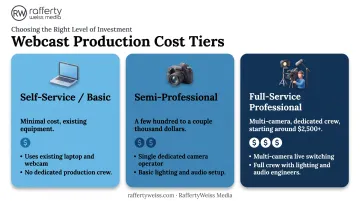
At RaffertyWeiss Media, a single-camera webcast for a half-day event typically starts around $2,500. More extensive hybrid productions (multi-camera coverage, redundant streaming, custom graphics) are quoted based on scope.
For broader context, a 2025 vendor benchmark from Remo places a high-quality virtual event with premium tools and services between $5,000 and $50,000, though that figure spans far more than webcasting alone.
Higher investment buys more production polish and audience trust. That tradeoff matters most for high-visibility events such as public agency briefings or corporate earnings calls.
Webcasting vs. Podcasting vs. Webinars: Clearing Up Related Terms
These formats get lumped together constantly, but each solves a different problem.
Podcasting is pre-recorded audio or video content released as part of an ongoing series on a set schedule. Unlike a one-off webcast, a podcast lives on a recurring cadence (weekly interviews, a monthly policy series) and is meant for on-demand listening rather than live viewing.
Webinars are smaller-scale, interactive online sessions, usually built for training, lead generation, or collaboration rather than broad broadcast. Platforms like Zoom separate hosts, panelists, and attendees, and while webinars can technically scale to large numbers, the interaction model, not headcount, is what sets them apart from a webcast.
Video conferencing is a different animal entirely: one-to-one or small-group real-time communication, built for collaboration rather than one-to-many broadcast. It's a meeting tool, not a broadcast medium.
| Format | Timing | Primary purpose |
|---|---|---|
| Webcast | Live or one-time | Large-audience broadcast event |
| Podcast | Episodic, on-demand | Recurring audio/video series |
| Webinar | Live, interactive | Training, demos, lead generation |
| Video conference | Real-time | Collaborative meetings |
Choosing the Right Approach for Your Organization
Picking the right format comes down to four questions:
- Who's your audience? Internal/confidential leans webcast; public/broad leans live stream.
- What's your budget? Minimal gear works for live streaming; webcasts need production investment.
- How formal or secure does this need to be? Regulated disclosures and government briefings demand controlled access.
- Do you need analytics? Webcasts typically build in registration data and engagement metrics; open live streams often don't.
For high-stakes corporate, government, or nonprofit events, the margin for error is thin. A dropped feed during an AGM or a poorly moderated Q&A during a public health briefing doesn't just look unprofessional. It undermines trust in the message itself.
That's where an experienced production partner makes the difference. RaffertyWeiss Media has spent more than 25 years producing video and live event content for organizations including the American Red Cross, Lockheed Martin, Georgetown University, HealthCare.gov, and Gallup.
That work includes multi-camera webcasts for annual meetings, congressional briefings, and press events. When accuracy and execution both matter, that experience shows up in the final broadcast.
Frequently Asked Questions
How much does webcasting cost?
Cost depends on production scale, equipment, and platform fees. A basic single-camera webcast can start around $2,500; full-service, multi-camera productions with redundant streaming cost more depending on scope.
What is the difference between webcasting and live streaming?
Webcasting targets a registered, often private audience with professional, scripted production. Live streaming favors open, public access and prioritizes immediacy over polish, though both can use similar underlying technology.
What is the difference between webcasting and podcasting?
Podcasting is pre-recorded, episodic audio or video released on a regular schedule for on-demand listening. Webcasting is typically a live or one-time broadcast event tied to a specific date and occasion.
How do I watch a webcast?
Most webcasts are accessed through a simple browser link, sometimes requiring registration or a password. No special software installation is needed on the viewer's end.
What does live webcast mean?
A live webcast is a real-time, professionally produced broadcast of an event delivered over the internet to a defined, often registered audience, not a prerecorded or on-demand version.
Do I need special software to host or watch a webcast?
Most modern webcast platforms are browser-based for viewers, so no special software is required to watch. Hosts, however, often use production software and hardware to manage multi-camera feeds and graphics.