Introduction
Nonprofits are competing for donor attention in a world where video content dominates every feed. The challenge is real: small teams, tight budgets, and the pressure to connect with supporters who have endless options for where to direct their generosity.
Live streaming has become one of the most effective equalizers. It lets organizations reach supporters anywhere in real time — no venue costs, no travel logistics, just direct, unfiltered connection. And online giving grew 15% in 2025, according to M+R Benchmarks 2026, which means donors are already comfortable giving digitally.
That digital comfort works in your favor. You don't need a Hollywood setup — just a clear goal, a compelling story, and enough technical stability to keep people watching. This article covers five practical tips, grounded in production experience and current fundraising research, to help nonprofits run live streams that convert viewers into donors.
Key Takeaways
- Set one specific goal and build a tight run-of-show before you go live
- Match your platform to where your existing audience spends time
- Anchor the stream with a real beneficiary story, not a generic impact summary
- Fix audio first — it matters more than camera quality for viewer retention
- Promote early and engage in real time — then repurpose the recording to extend your reach
Tip 1: Set Clear Goals and Plan a Tight Run-of-Show
Start With One Goal
Before you write a single agenda item, answer this question: what does success look like at the end of this stream? A vague answer — "raise money" or "build awareness" — leads to unfocused programming. A specific goal shapes everything else.
Examples of goals that actually drive decisions:
- Raise $10,000 toward an emergency relief fund by end of stream
- Convert 50 new monthly donors at $25/month
- Register 200 attendees for an upcoming volunteer orientation
That specificity determines your ask timing, your story selection, and how you frame progress during the event.
Build a Lean Run-of-Show
Once your goal is locked in, it drives the structure of the entire event. Keep the stream to 30–60 minutes — viewers can click away at any moment, unlike guests at an in-person gala.
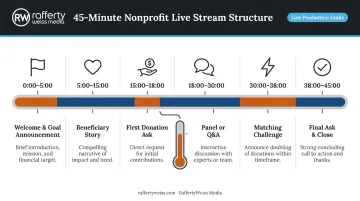
A sample 45-minute run-of-show looks like this:
| Time | Segment |
|---|---|
| 0:00–5:00 | Welcome, mission framing, goal announcement |
| 5:00–15:00 | Beneficiary story or field report |
| 15:00–18:00 | First donation ask + progress update |
| 18:00–30:00 | Panel discussion, Q&A, or second story |
| 30:00–38:00 | Matching challenge or milestone moment |
| 38:00–45:00 | Second ask, thank-yous, close with replay CTA |
Research on goal proximity supports the mid-stream ask structure. Cryder and Loewenstein's work on tangibility and giving found that donors respond more generously when they can see a fund approaching completion — including a disaster relief case where donations peaked when the goal was 85% funded. Show a progress thermometer and update it visibly throughout the stream. The final ask matters, but momentum builds well before that.
Tip 2: Choose the Right Platform for Your Audience
Platform selection comes down to one question: where does your audience already spend time?
Pew Research's 2025 data gives clear guidance on where U.S. adults spend time:
- YouTube — 84% of U.S. adults use it, with strong reach across every age group (95% of adults 18–29, 64% of adults 65+)
- Facebook — 71% of U.S. adults; skews older and already hosts established nonprofit communities
- Instagram — Reaches 80% of adults 18–29 but only 19% of adults 65+, making it a poor fit for major donor audiences
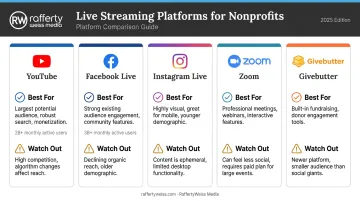
Those numbers point to where your stream should live. The table below maps each platform to the scenarios where it performs best.
Platform Quick Reference
| Platform | Best For | Watch Out | |----------|----------|-----------|| | YouTube Live | Broad reach, searchability, replay value; supports donation buttons for eligible channels | Requires 10,000 subscribers for YouTube Giving eligibility | | Facebook Live | Existing page audiences, older donor base; native donate button available | Facebook fundraising tools generated only 0.2% of online revenue in 2024 — don't rely on it as your sole donation path | | Instagram Live | Younger audiences, story-driven campaigns | Steep age skew; limited for major donor audiences | | Zoom | Private donor briefings, VIP stewardship, board Q&As | Not a native donation platform — pair with a standalone donation page | | Givebutter | All-in-one donation page, ticketing, and live stream in one place | Best when donation flow matters more than production flexibility |
Multi-Streaming
Platforms like StreamYard (paid plans support 3–10 simultaneous destinations) and Restream (30+ platforms on paid tiers) let small teams broadcast to multiple channels at once. For most nonprofits, the most reliable starting point is a dedicated donation page plus one or two social channels where your audience already lives.
Tip 3: Tell a Story That Moves People to Act
Structure: Problem, Hero, Transformation
The most effective nonprofit live streams aren't presentations — they're structured narratives. The framework is simple:
- Introduce the problem your mission exists to solve
- Show a real person affected by it — specific, named, with concrete details
- Demonstrate the transformation that donor support makes possible
Research supports the specificity requirement. Studies cited by Cryder and Loewenstein found that donations increased by over 60% when a recipient was identified by name, age, and image — compared to statistical descriptions of need. A line like "Maria, a single mother from Bethesda, completed six months of job training" does more work than "hundreds of families in our region."
A 2024 study published in PMC found that identifiable victim effects don't always increase donations and can sometimes backfire. The stronger approach: lead with a specific story, then connect it to scale and visible progress. One person's story earns emotional investment. The broader impact data justifies the ask.
Make the Donor the Hero
Position the donor as the agent of change — not the organization. Your role is to make Maria's job training possible; the donor's generosity is what actually does it. People give when they can see themselves as the direct cause of something good, so that reframe matters.
Delivery Matters as Much as the Script
Written scripts feel stiff on camera. Encourage hosts and storytellers to work from talking points and practice conversationally. A stream that feels live and slightly imperfect is more compelling than one that sounds rehearsed — but your timing, story beats, and ask moments should still be mapped in advance.
Place the donation ask right after the emotional peak of the beneficiary story. Wait until the very end, and viewers are already logging off.
Tip 4: Invest in Production Quality — Even on a Budget
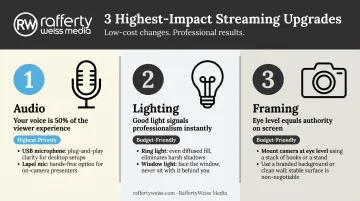
The Three Highest-Impact Upgrades
Poor audio, bad lighting, or an unstable connection won't just make your stream look unprepared — they'll cause viewers to disengage. Research consistently shows that stream quality directly affects how quickly viewers drop off.
The good news: the most important upgrades are cheap.
Audio (highest priority):
- A USB microphone or lapel mic eliminates background noise far better than a built-in laptop mic
- YouTube's automatic captions are affected by accents, mispronunciations, and background noise — a clear mic improves both comprehension and accessibility
Lighting:
- A basic ring light or a speaker positioned near a window dramatically improves perceived video quality
- Avoid overhead fluorescent lighting, which creates unflattering shadows
Framing:
- Camera at eye level (not looking up from a laptop on a desk)
- Clean, branded background — even a simple branded banner works
- Stable surface or tripod; no handheld shaking
Bandwidth Is Not Optional
Test your upload speed before the event. Facebook Live recommends 1,500–4,000 Kbps for 720p streaming; Zoom requires 1.2 Mbps up/down for HD video. Use a wired Ethernet connection where possible, and avoid streaming from locations with unreliable Wi-Fi. Run a full tech rehearsal, including a donation-link test, at least 24 hours before the event.
When to Bring in Professional Support
A tech rehearsal handles most problems — but for annual galas, major campaign launches, or events targeting major donors, the stakes call for something more. RaffertyWeiss Media has worked with nonprofits including American Red Cross, AARP, United Way, and Fourblock on live event production and virtual summits, including a two-day virtual summit for GirlUp that drew 50,000 live viewers on YouTube.
Their full-service model covers multi-camera production, backup streaming systems, branded staging, and post-event video delivery, removing the technical risk entirely from the nonprofit's team.
Either way, a well-lit, clearly heard stream can feel personal and engaging. A technically poor one just signals that the event wasn't ready.
Tip 5: Promote Before, Engage During, and Repurpose After
Before: Build Anticipation Through Email
According to Nonprofit Tech for Good, 33% of donors say email is the tool that most inspires them to give. That makes email the backbone of any pre-stream promotion plan — not an afterthought.
A practical promotion timeline:
- 2 weeks out — Announce the stream across email, social media, and your website
- 3 days out — Share a teaser clip or behind-the-scenes preview
- Morning of — Send a day-of reminder to registered attendees
Cross-promote on social channels, but drive people back to a single donation page. Every distraction from that path costs you conversions.
During: Keep Engagement Active
Once you're live, momentum is everything. Dead air loses viewers fast — use platform features to keep the experience active:
- Call out viewer names and comments on screen — it makes the experience feel personal
- Use polls or live Q&A to invite participation
- Show a donation progress thermometer and update it visibly
- Time a matching gift challenge or milestone celebration for the emotional peak of your story segment
M+R Benchmarks reports that nonprofits received 37% of their 2025 online revenue in December — meaning urgency framing around giving seasons and campaign deadlines is particularly effective for year-end streams.
After: Treat the Recording as an Asset
The live event is the beginning of the content's life, not the end. Plan your post-stream distribution before you go live.
What a single live stream recording can become:
- 30–60 second social clips from the strongest story moments
- Full recording embedded in a post-event email campaign
- A standalone donor cultivation video built around the beneficiary story segment
- Blog content transcribed from key segments
- An impact reel for future grant applications or board presentations
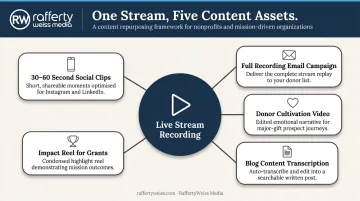
RaffertyWeiss Media's post-production team works with nonprofits on exactly this kind of follow-through — editing live recordings into social clips, highlight reels, and donor videos so one production budget goes further than just the night of the event.
Frequently Asked Questions
What are the top live streaming platforms for nonprofits?
Facebook Live, YouTube Live, Instagram Live, Zoom, and Givebutter are the most accessible options for nonprofits. Choose based on where your existing audience is most active and whether you need integrated donation tools — Givebutter and YouTube Giving both support in-stream donations for eligible organizations.
How long should a nonprofit live stream be?
Most nonprofit live streams perform best in the 30–60 minute range. Unlike in-person events, viewers can leave at any time — so tighter programming with a clear structure and planned ask moments consistently outperforms longer, open-ended formats.
What is the 80/20 rule for nonprofits?
Many practitioners apply an 80/20 guideline to nonprofit content: roughly 80% mission and community-focused material, 20% direct fundraising asks. For live streams, this means centering your program on stories and engagement so that when the ask arrives, it lands as a natural moment rather than a pitch.
Do I need professional equipment to start live streaming for my nonprofit?
No. A smartphone or laptop camera, a basic USB microphone, and good natural lighting are enough to get started. Audio quality matters most — poor sound causes viewers to disengage faster than imperfect video does.
How can I measure the success of a nonprofit live stream?
Track peak concurrent viewers, total watch time, comments and active engagement, donations generated during and after the stream, and post-stream video views. Comparing these numbers across events reveals which programming choices resonate most with your audience.
Why do charities ask for $19 a month instead of $20?
Odd numbers just below a round figure feel smaller and more approachable to donors — a well-documented psychological pricing effect. Monthly giving accounted for 27% of all online revenue in 2025, according to M+R Benchmarks, making recurring ask framing a worthwhile part of any live stream strategy.