Attendee expectations have shifted considerably. In 2026, participants arrive expecting seamless multi-session navigation, AI-driven engagement features, and broadcast-quality video — not a scaled-up video call. The virtual events market was valued at $98.07 billion in 2024 and is projected to reach $297.16 billion by 2030, reflecting how central these platforms have become to how organizations communicate at scale.
This guide covers the five leading virtual conference hosting platforms, how they compare across key selection criteria, and what each one does best — so you can match the right tool to your organization's specific needs.
Key Takeaways
- The right platform depends on your audience size, event format, and technical environment — there's no universal winner.
- Top platforms for 2026: Zoom Events, Microsoft Teams, Webex Events, ON24, and Airmeet.
- Core selection criteria: attendee capacity, engagement tools, CRM/ecosystem integrations, security, and pricing structure.
- Enterprise and government users should prioritize compliance and Microsoft/Cisco ecosystem compatibility.
- Nonprofits and associations do better with simpler interfaces and flexible pricing tiers.
- Choose your platform wisely, then invest in video quality — polished keynotes, branded segments, and strong session openers are what attendees remember.
Virtual Conference Platforms in 2026: What You Need to Know
Not all video tools are conference platforms. A virtual conference platform is built to support multi-session agendas, attendee registration flows, sponsor and exhibitor management, networking features, and post-event analytics. That scope goes well beyond a basic video call or a single-room webinar.
Two trends are defining platform choices this year. Hybrid event support is now a baseline expectation: most enterprise-grade platforms handle simultaneous in-person and remote audiences without requiring separate tools.
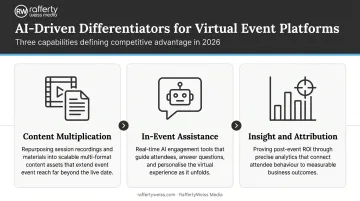
According to Forrester's 2026 commentary on virtual event platforms, setup, registration, and live streaming are table stakes. The real differentiation sits in three AI-driven capabilities:
- Content multiplication — how well platforms help you repurpose session recordings and materials
- In-event assistance — AI tools that keep attendees engaged in real time
- Insight and attribution — how effectively platforms help you prove ROI after the event
Here are the platforms best positioned across all three of those areas in 2026.
Best Virtual Conference Hosting Platforms in 2026
These platforms were selected based on reliability, feature depth, scalability, and fit for corporate, government, and nonprofit event organizers. Each entry covers key features, pricing structure, and the specific use cases where the platform performs best — so you can match the tool to your event type, not the other way around.
Zoom Events & Webinars
Zoom's near-universal name recognition means most attendees already know how to join, share their screen, and navigate breakout rooms — removing the onboarding friction that can derail less-familiar platforms. Its dedicated Events and Webinars tier extends well beyond standard meetings — supporting a multi-session event hub, branded registration pages, production studio tools, and simulive capabilities for pre-recorded content playback.
Standard Zoom Events and Webinars Plus sessions support up to 100,000 attendees, with single-use licenses available for events up to 1 million attendees (announced by Zoom in August 2024).
| Feature Area | Details |
|---|---|
| Key Features | HD video/audio, multi-session event hub, breakout rooms, Q&A, polls, session recording, branded registration, simulive/backstage tools, analytics |
| Pricing | Flat-rate monthly pricing for Webinars and Events tiers; starting capacities from 500 attendees with larger licensed tiers available. Visit Zoom's Events and Webinars pricing page for current rates. No verified free tier for Events/Webinars (consumer Zoom Basic is separate). |
| Best For | Organizations of all sizes needing a widely accessible, low-friction platform for corporate conferences and hybrid events |
Microsoft Teams
For organizations already running on Microsoft 365, Teams is the path of least resistance. Calendar invites flow through Outlook, recordings land in SharePoint, and IT governance requirements are met without custom workarounds. That ecosystem continuity carries real weight in regulated or enterprise environments.
Teams town halls support up to 10,000 attendees at the standard tier. Microsoft 365 Business Standard ($12.50/user/month) is the entry point for organized webinars with registration and reporting. Teams Premium ($10/user/month as an add-on) unlocks advanced branding, intelligence, and higher-capacity paths.
Important note: Microsoft Teams Live Events are retiring in July 2026. Town halls are the current recommended format for large virtual audiences.
| Feature Area | Details |
|---|---|
| Key Features | Town halls (up to 10,000), webinars with registration, breakout rooms, screen sharing, recording, real-time translation, full Microsoft 365 integration |
| Pricing | Teams Essentials: $4/user/month; Business Basic: $6/user/month; Business Standard: $12.50/user/month; Teams Premium: $10/user/month add-on |
| Security/Compliance | Two-factor authentication, encryption at rest and in transit, ISO 27001, HIPAA, SSAE18 SOC 1 & SOC 2 |
| Best For | Corporate and government organizations already operating within the Microsoft 365 ecosystem that need compliance-grade conferencing |
Webex Events (Cisco)
Webex is built for scale and security — two things that matter when you're running a high-attendance government briefing or a sensitive corporate conference. Cisco's compliance credentials are extensive: FedRAMP Authorized, HIPAA compliant, ISO 27001, SOC 2 Type II, and HITRUST, along with several additional certifications relevant to federal procurement.
Capacity tiers run from 1,000 to 100,000 attendees, with transparent per-tier pricing (1,000 attendees at approximately $675/license annually). The AI Assistant provides real-time meeting summaries, recaps, and action items. Real-time translation covers 16 spoken languages with captions available in over 100 languages.
For organizations integrating pre-recorded content, Webex's on-demand playback handles broadcast-quality session videos cleanly — an important consideration when your conference content has been professionally produced rather than recorded live.
| Feature Area | Details |
|---|---|
| Key Features | Up to 100,000 attendees, AI meeting assistant, real-time translation (16 languages, 100+ caption languages), polling, Q&A, recording, end-to-end encryption, hybrid event support |
| Pricing | Capacity-based pricing: ~$675/year for 1,000 attendees; $275/month for 3,000; $412.50/month for 5,000; $605/month for 10,000. Custom pricing for 25,000–100,000 tiers. |
| Best For | Large enterprises and government agencies hosting high-attendance, security-sensitive virtual or hybrid conferences |
ON24
ON24 approaches virtual conferences as a pipeline tool, not just an event format. Its AI-powered engagement analytics track individual attendee behavior — which sessions they watched, how long they stayed, which content they clicked — and route that data directly to Salesforce, Marketo, and other CRM/marketing automation systems. That makes it the strongest option when conference ROI needs to be measured in leads, pipeline, or member engagement metrics.
ON24 supports white-label branded experiences, virtual exhibit halls, on-demand content hubs, and live streaming within a single platform.
| Feature Area | Details |
|---|---|
| Key Features | AI engagement analytics (ACE), CRM/MAP integration (Salesforce, Marketo), white-label branding, virtual exhibit halls, on-demand content, live streaming, lead scoring |
| Pricing | Custom enterprise pricing — no published self-serve tiers. Request a quote based on event scale and feature needs at ON24's pricing page. |
| Best For | Marketing-led enterprises and associations using virtual conferences for lead generation, audience development, or member engagement with measurable ROI goals |
Airmeet
Airmeet is the networking-first platform on this list. The entire experience is structured around attendee interaction — virtual social tables for open-ended conversations, customizable event stages, exhibitor/sponsor booths, and a social lounge that replicates the casual hallway dynamic of in-person events.
It's a natural fit for nonprofits, associations, and corporate teams where the relationships built during the event matter as much as the sessions themselves. Airmeet supports events from 100 to 10,000 attendees, with a free plan available for up to 100 participants.
| Feature Area | Details |
|---|---|
| Key Features | Customizable event stages, virtual social tables (Social Lounge), breakout rooms, sponsor/exhibitor booths, polls, Q&A, live chat, real-time analytics, whiteboards |
| Pricing | Free plan: up to 100 participants/event. Paid plans start at $167/year (billed annually), scaled by attendee volume. |
| Best For | Nonprofits, associations, and corporate teams prioritizing branded, networking-forward virtual conference experiences |
How to Choose the Right Platform
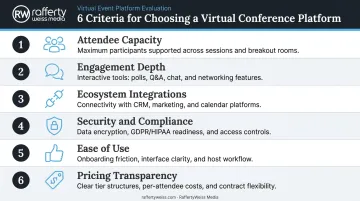
These six criteria should drive your evaluation:
- Attendee capacity — Verify your expected attendance against the plan limits before committing. A platform that caps at 1,000 when you need 3,000 becomes an expensive problem mid-registration.
- Engagement depth — Polls, Q&A, and breakout rooms aren't interchangeable across platforms. Some offer robust moderation tools; others treat these as afterthoughts.
- Ecosystem integrations — Does it connect to your CRM, marketing automation, or calendar system? Disconnected tools mean manual data cleanup after every event — a hidden cost that compounds fast.
- Security and compliance — Government and healthcare organizations should verify FedRAMP, HIPAA, and SOC 2 status before shortlisting any platform.
- Ease of use — A platform with a steep learning curve costs organizers and attendees real hours in setup and support.
- Pricing transparency — Per-user, per-event, and per-attendee models behave very differently at scale. Understand the cost at your actual attendance volume, not just the entry price.
Common Mistakes to Avoid
- Going with the cheapest option without checking capacity limits — overage fees or forced plan upgrades right before your event are avoidable.
- Choosing on name recognition over ecosystem fit — a platform that doesn't connect to your existing tools creates more work, not less.
- Overlooking engagement tools — for multi-hour virtual events, passive viewing is the default. Robust polling, Q&A, and networking features directly affect whether attendees stay or drop off.
Match the platform to your specific event format, audience size, IT environment, and whether you're running a purely virtual or hybrid conference — then narrow your shortlist from there.
Conclusion
The best virtual conference platform is the one that fits your organization's scale, security requirements, and event objectives — not the one with the most name recognition or the lowest entry price. Start with a trial, run a test event before committing to a high-stakes conference, and validate performance under conditions close to your actual use case.
Once you've selected your platform, video content quality becomes the deciding factor in whether the event lands well. Keynote recordings, session openers, branded b-roll, and speaker introductions don't just fill airtime — they establish production quality and set the tone for everything that follows.
When RaffertyWeiss Media helped GirlUp transform their flagship Washington D.C. Summit into a fully virtual event, the production reached 50,000 live viewers across two days. That kind of reach requires both the right platform and content built to perform within it.
RaffertyWeiss Media has spent over 25 years producing video content for corporate, government, and nonprofit clients, including federal agencies like the CDC and Department of Justice and associations like AARP and the American Psychological Association. If your organization is planning a virtual or hybrid conference, contact RaffertyWeiss Media to make sure the content side is as strong as the platform you've chosen.
Frequently Asked Questions
What's the best virtual conference hosting platform?
There's no single best option — it depends on your event scale and organizational context. Zoom Events suits broad accessibility, Microsoft Teams fits Microsoft-heavy enterprises, Webex handles large high-security events, ON24 excels for data-driven marketing teams, and Airmeet is ideal for networking-focused conferences.
What features should I look for in a virtual conference platform?
Prioritize attendee capacity, breakout rooms, Q&A and polling tools, session recording, CRM or marketing integrations, and security/encryption. In 2026, hybrid event support — simultaneous in-person and remote participation — is increasingly a baseline requirement rather than a premium feature.
How much does a virtual conference platform cost?
Pricing varies by model: Microsoft Teams runs $4–$12.50 per user/month, Zoom Events and Webex charge by attendee capacity, Airmeet starts at $167/year, and ON24 uses custom enterprise pricing. Always calculate cost at your actual expected attendance volume.
What's the difference between a virtual conference platform and a webinar tool?
Webinar tools are primarily one-to-many broadcast formats with limited attendee interaction. Virtual conference platforms support multi-session agendas, two-way networking, breakout rooms, exhibitor spaces, and full event management — designed for complex, multi-hour or multi-day events with active audience participation.
Can virtual conference platforms support hybrid events?
Yes. Most leading platforms in 2026 support hybrid functionality. Webex, Zoom Events, and Microsoft Teams are among the strongest options, with tools built to deliver consistent experiences across in-person and remote audiences.
How many attendees can virtual conference platforms support?
Capacity varies widely. Free Zoom tiers start at 100 participants; Microsoft Teams town halls support up to 10,000; Webex scales to 100,000. Airmeet handles up to 10,000. Always verify limits against your expected attendance before selecting a plan.