A well-made explainer video does more than look polished. It turns a confused visitor into a confident buyer, cuts down repetitive support questions, and shortens the entire sales cycle. This post breaks down the product explainer video examples worth studying for 2026, the formats available today, and how to pick the right one for your product.
TL;DR
- A product explainer video is a 60-90 second clip showing what a product does, who it's for, and why it matters
- Top 2026 formats: animated, live-action, screencast, and AI-avatar—matched to product type and budget
- Choose based on format-to-product fit and script quality, not visual flair alone
- Costs run from free DIY tools to $50,000+; most pro videos land around $5,400–$11,000
Overview of Product Explainer Videos Heading Into 2026
A product explainer video is a short piece of content built to answer one question fast: why should someone care about this product? Teams that bury that answer in feature lists or long demos lose attention before the value lands.
An explainer focuses on function and value, not everything the product can technically do. That sets it apart from a brand video built for emotional connection and trust, or a long-form demo that walks through every feature in detail.
Video's influence on buying decisions keeps growing. Eighty-five percent of people say they've been convinced to buy a product or service after watching a video, according to Wyzowl's 2026 video marketing survey. That's not a niche trend anymore. It's the default way people evaluate a purchase before they ever talk to sales.
Below are product explainer examples still worth studying in 2026, across formats and industries, with notes on what makes each one work.
Top Product Explainer Video Examples for 2026
These examples were chosen for one reason: they solve the format-and-message puzzle well. The evaluation criteria are clarity of message, format-to-product fit, pacing, and business impact you can actually point to.
Dropbox – Animated Explainer
Produced by Common Craft in 2009, this 2:17 video became the reference point for product video ROI in SaaS. It opens with the problem of scattered files across devices before Dropbox ever appears on screen, and it's built around one idea rather than a feature checklist.
| Element | Detail |
|---|---|
| Format & Runtime | 2D animation, roughly 2 minutes |
| Standout Technique | Problem-first narrative with minimal on-screen text |
| Why It Works | Placed on Dropbox's homepage, it drew an estimated 30,000 views per day and more than 25 million total views, showing that a clear idea outperforms a flashy one |
Slack – Motion Graphics Explainer
Slack's 2014 launch video introduced its core value proposition into a crowded productivity market already full of messaging tools. Instead of listing features, it frames every one of them as an outcome: less email, faster decisions, calmer teams.
| Element | Detail |
|---|---|
| Format & Runtime | 2D motion graphics, roughly 1 minute 47 seconds |
| Standout Technique | Problem-solution-proof scripting structure |
| Why It Works | Keeps jargon out entirely and centers the story on team communication pain points, which producer Thinkmojo credits for the video's unusually high completion rates |
Dollar Shave Club – Live-Action Explainer
Shot in a single day in 2012 for $4,500, this video features founder Michael Dubin walking through a warehouse, speaking straight to camera with self-aware humor. It establishes brand personality, product, and a clear call to action within the first fifteen seconds.
| Element | Detail |
|---|---|
| Format & Runtime | Live-action, under 2 minutes |
| Standout Technique | Founder-led direct address with deadpan comedy |
| Why It Works | Drove 12,000 orders in 48 hours and crashed the site, per Dubin's account in Inc.. Still cited as proof low-budget live-action can beat expensive production |
Loom – Screen Recording Hybrid
Loom sells screen recording software, and it markets itself using its own screen recording format. The video leads with the buyer's problem (clunky async communication) before any feature appears, keeping the interface walkthrough clean throughout.
| Element | Detail |
|---|---|
| Format & Runtime | Screen recording with motion graphic overlays, around 90 seconds |
| Standout Technique | Format matches the product being sold |
| Why It Works | Shows that screen recording can feel polished without a full production budget, layering in text, arrows, and camera-bubble presenter footage rather than a raw capture |
Airbnb – Lifestyle Storytelling
Airbnb's "Made Possible by Hosts" campaign leans on real photographs from actual host homes rather than a single scripted narrator. It's closer to documentary-style lifestyle storytelling than a traditional testimonial explainer, and it builds trust without a hard product pitch.
| Element | Detail |
|---|---|
| Format & Runtime | Photo-montage/documentary style, 2-3 minutes |
| Standout Technique | Real host imagery over a single polished script |
| Why It Works | Sells the outcome (belonging, income, connection) instead of the platform's feature set, a technique that translates well beyond travel |
Miro – AI-Assisted Explainer
Miro, the online whiteboard platform, uses HeyGen to scale localized product video content across global markets rather than reshooting with human presenters for every language. That workflow reflects where explainer production is heading in 2026: faster turnaround without sacrificing polish.
| Element | Detail |
|---|---|
| Format & Runtime | AI-assisted video localization, short-form |
| Standout Technique | HeyGen used to adapt product video content across languages and markets at scale |
| Why It Works | Signals how AI tools are lowering the cost barrier for professional-quality explainer content, especially for teams producing multiple language versions |
This shift isn't a fringe experiment. Sixty-three percent of video marketers now use AI tools to help create or edit marketing video, per Wyzowl, up sharply from just a few years ago.
Types of Product Explainer Videos to Consider in 2026
Choose a format based on your product, audience, and budget—not portfolio flash. Here's how the main options break down:
- Animated/2D explainers: Best for software, platforms, and services that need to show abstract workflows or integrations you can't easily film
- Live-action demos: Best for physical products and equipment where seeing the item handled builds trust
- Motion graphics and screen recording: A cost-effective middle ground for product and training teams working lean
- AI-avatar and AI-assisted videos: A 2026 option for teams that need fast, scalable, multi-language content
- Interactive explainers: A growing format that lets viewers click inside the video to explore features, paths, or next steps
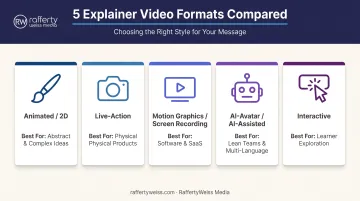
RaffertyWeiss Media's team has built character animation, whiteboard explainers, and live-action/animation hybrids for clients from Fannie Mae to federal agencies. The deciding question is simple: which format will make this audience understand the product fastest?
How These Examples Were Chosen
The most common mistake brands make is chasing visual trends instead of format-to-product fit. A gorgeous 3D animation means nothing if it buries the point in the first ten seconds. A viral-style live-action video won't land if your product is a complex enterprise platform.
Each example above was evaluated against four factors:
- Narrative clarity – does it open with the problem, not the product?
- Pacing – does it respect the viewer's time?
- Format appropriateness – does the visual style match what's being sold?
- Measurable business outcomes – is there evidence it actually worked?
The same discipline belongs on every project, not just the flashy ones. RaffertyWeiss Media has applied these criteria across more than 25 years of corporate and government video work, from Section 508-compliant training modules to multilingual public awareness campaigns.
Conclusion
The best explainer video format is the one that matches your product, your audience, and your budget—not the flashiest option on the reel. Dropbox didn't need live-action, and Dollar Shave Club didn't need animation. Each brand picked the format that fit its story.
Before you commit to a script, a format, or a budget, hold your product up against the examples above. Ask which one your buyer would actually sit through.
If you're ready to plan a product explainer video that informs, persuades, and performs, RaffertyWeiss Media has spent more than 25 years helping corporate, government, and nonprofit clients figure out exactly that. A strategy call is the first step, well before anyone picks up a camera or opens an animation file.
Frequently Asked Questions
What are the best explainer videos?
Dropbox, Slack, and Dollar Shave Club still set the bar. Each opens on a clear problem, then introduces the product, and matches its format—animation, motion graphics, or live-action—to what it's selling.
How much do explainer videos cost?
Costs range from free DIY tools to $50,000+ for agency-level productions. Wyzowl's benchmark research puts the median cost of a 60-second animated explainer at $5,400, with a mean closer to $11,000.
What is a product demonstration video?
A product demo is a deeper walkthrough of features and functionality that shows how something works. A product explainer is shorter and benefit-focused—built to pitch the value rather than teach the mechanics.
How long should a product explainer video be?
Sixty to 90 seconds is standard for conversion-focused explainer content. Longer runtimes—sometimes 2–3 minutes—work well for onboarding or in-app content where the viewer is already committed.
Which type of explainer video format is right for my product?
Physical products generally suit live-action, since seeing the item handled builds trust. Software products suit animation or screen recording, depending on budget and how abstract the workflow is.
Should I DIY my explainer video or hire a professional production company?
DIY tools work fine for early-stage, low-stakes content like internal updates or quick social clips. Conversion-critical or brand-facing videos benefit from professional scripting, filming, and editing so the message stays clear and credible.